Category: Comparison Guide

  • Best Software for Food Wholesalers and Distributors

    Running a food wholesale business means dealing with chaos every single day. Juggling items that spoil quickly sits alongside wild price swings from suppliers. Orders come in different currencies, while customers send messages through WhatsApp without warning. Sales teams stick to old spreadsheet habits instead of modern tools. Mistakes creep in easily when systems barely hold together. Wasted time turns into lost money quicker than expected.

    Midnight rolls around faster when you are stuck typing instead of clicking. Firms tracking orders by hand face paperwork loads forty to fifty percent heavier compared to teams running on tailored tools. Gains pile up elsewhere – think client growth, sharper pricing talks, or simply shutting down work earlier. What eats hours one day adds up to lost chances over weeks.

    Here’s the catch: plenty of programs labeled for wholesale trade actually ignore food needs. Instead of handling spoilage right, standard stock apps fall short. Even strong ERPs demand endless setup time along with sky-high fees. Most setups also expect buyers to order online – forgetting how many still send voice messages via chat.
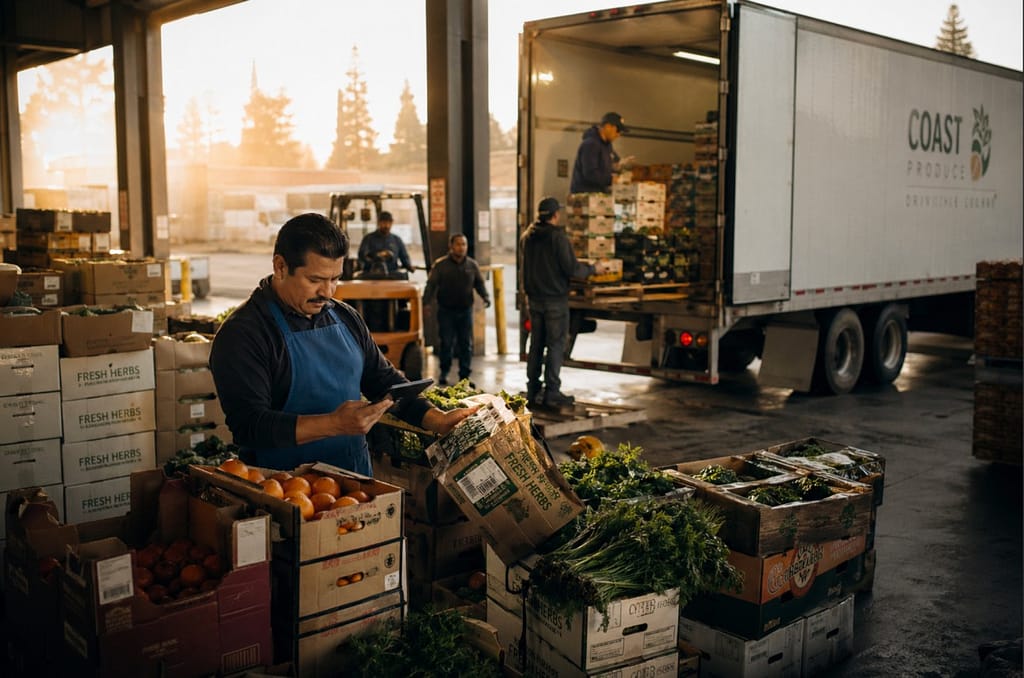
    This guide walks through seven top tools built for food wholesalers in 2026 – spelling out which teams benefit most, yet where each one falls short. While some fit big distributors well, others suit small operations better; not every platform delivers equally across the board. Each option shows strengths, though specific needs shape whether it clicks or misses entirely.

    Table of Contents:

    1. What to Look For in Food Wholesale Software
    2. The 7 Best Software for Food Wholesalers (2026)
    3. Head-to-Head Comparison Table
    4. How to Choose the Right Software for Your Business Size
    5. FAQs
    6. The Bottom Line

    What to Look For in Food Wholesale Software

    Most wholesale systems aren’t made for how food moves out the door. When trucks are loading at 6 AM, small flaws in the software start screaming for attention. Knowing which features matter most makes it easier to tell them apart before things get hectic.

    AI-powered order management is no longer a premium feature.Top systems in 2026 create bills automatically, recommend how much to restock, catch odd prices, while also pulling orders straight from WhatsApp chats. Without built-in smart features, you’ll end up patching gaps with extra steps.

    Food-specific workflows matter more than you might expect. Food importers need tools that handle batch details, track expiration dates, manage variable weights on invoices, while also monitoring stock inside containers. Standard inventory systems usually lack such features right away.

    WhatsApp and chat-based ordering is how most people buying food in growing markets prefer to place orders. Logging into a system just does not catch on when it skips their usual way of chatting. Starting elsewhere rarely sticks if it ignores daily habits.

    Multi-currency and global trade support is essential when dealing with international suppliers or cross-border sales. Working out total delivered costs becomes easier when duties are tracked automatically. Dealing with vendors using foreign money works better without extra accounting steps getting in the way. Keeping everything together saves time and reduces errors along the way.

    Mobile-first design matters for your field sales team and for warehouse staff who are not sitting at a desk. If the mobile experience is clunky, your team won’t use it.

    Realistic pricing and implementation time are worth evaluating honestly. Take a system running fifty grand with half a year just to launch – that kind of weight slows down most food distribution businesses. What hits fast makes a difference.

    Now, here are the seven tools worth evaluating.

    The 7 Best Software for Food Wholesalers (2026)

    1. Prosessed (OrderIT) – Best for Food Wholesalers and Importers

    What sets Prosessed apart? It’s made just for people moving food across borders – importers, exporters, shippers. The main tool, called OrderIT, runs the entire ordering process start to finish. Intelligence drives it, woven into every step along the way.

    Here’s what sets Prosessed apart – built on real wholesale needs, not guesses from someone behind a screen. When orders arrive through WhatsApp? OrderIT pulls them straight in. Need invoices made automatically right after an order hits? It handles that without delay. Pricing shifts depending on volume, buyer level, or money type? Already part of the system. Wondering if you’ll get stuck with stock nobody wants? Forecast tools help avoid exactly that.

    Machine learning powers what some might call an AI layer – no empty branding here. Instead of guessing when supplies run low, past sales help shape smart restocking alerts. Unusual price tags or odd order sizes get noticed early. Mistakes that could drain budgets often start small, but spotting them does not have to be slow.

    Most platforms struggle when currencies shift, yet this one adjusts without extra steps. Tracking single containers matters more than people admit – it sees what others overlook. Anyone dealing with overseas food shipments knows timing gets messy, especially nights and weekends. Orders pop up whenever buyers decide, no schedule required. Juggling many products feels smoother here than almost anywhere else. When your job means handling hundreds of items across far-flung partners, simplicity becomes critical. It fits those moments when chaos seems normal.

    Best for: Food wholesalers, importers, exporters, and distributors of all sizes
    Standout features: AI order entry via WhatsApp, dynamic pricing, demand forecasting, multi-currency support
    Limitation: Focused on food and FMCG, not a fit for non-food wholesale

    Start a free trial with Prosessed or book a 20-minute demo to see OrderIT in action.

    2. Cin7 – Best for Multichannel Wholesale

    Cin7 handles stock and orders reliably, especially if you sell through more than one place – like stores, online, or bulk buyers. Because it connects easily with many other tools, managing what’s in stock becomes smoother over time. Purchase requests get organized without much fuss. Reports come together clearly, shaped by real usage rather than guesswork. Features have had room to grow, so they fit how actual teams work.

    Food distributors might find Cin7 lacking when it comes to smart tools built for their needs. Instead of artificial intelligence features, users get basic operations without much guidance. Messaging through WhatsApp isn’t supported right out of the box. Predicting what stock will sell? That function doesn’t exist here either. Workers in storage areas often struggle at first because the layout feels confusing. When dealing with items that expire quickly and inventory that moves fast, missing automated support slows everything down.

    Still, when your wholesale operation spans multiple channels – especially beyond just food – a system like Cin7 might fit well, especially with its links to online stores and bookkeeping apps. Curious how it holds up next to software made only for food businesses? Check the Cin7 Alternative guide for a closer look.

    Best for: Multichannel wholesalers with mixed product categories
    Standout features: Strong integrations, inventory management, multichannel support
    Limitation: Steep learning curve, no AI features, not built for food-specific workflows

    3.QuickBooks Commerce – Best for SMBs with QuickBooks

    QuickBooks Commerce fits small wholesale shops already using QuickBooks every day. Because the link to accounting works without hiccups, shifting data feels smooth. Teams lacking tech experts won’t struggle either, since the layout stays clear and straightforward. What stands out is how little setup it demands just to get going.

    Once things get complicated, gaps start showing up. Workflows built just for food? Missing entirely. Catch-weight billing isn’t there, nor does it track when batches expire, plus messaging orders via WhatsApp won’t work here. International trade tools feel like an afterthought – barely enough for basic needs. The system feels shaped by local small-scale selling, not the messy reality of moving goods across borders, which most importers deal with every day.

    Starting with spreadsheets? Then moving into QuickBooks might make sense for a small local distributor. Yet when goods come from abroad – or drivers hit the road selling full time – this setup won’t stretch far.

     Best for: Small domestic wholesalers already using QuickBooks
    Standout features: QuickBooks integration, clean interface, affordable pricing
    Limitation: Limited food-specific features, poor global trade support, no AI capabilities

    4. NetSuite ERP – Best for Large Enterprises

    One big reason NetSuite stands out? It handles money tracking, stock levels, deliveries, customer records – all inside one system. When you run a major food delivery operation and have tech staff ready, plus years to set things up, this kind of setup makes sense. What holds it together isn’t magic – it’s how everything links without extra tools.

    Heavy demands trail close behind its capabilities. Most companies spend half a year or longer getting NetSuite up and running, often paying big money long before subscriptions start adding up. Screens feel packed. Tweaking anything usually means calling in coders. Justifying the full expense proves tough when you’re a medium-sized food distributor.

    Most companies making under roughly fifty million dollars each year find NetSuite too much. Sure, it brings room to adapt how things run. Yet that comes with added layers that slow decisions down.

     Best for: Large enterprise food distributors with dedicated IT resources
    Standout features: Full ERP coverage, finance, inventory, supply chain, CRM
    Limitation: Very expensive, long implementation time, excessive complexity for most food wholesalers

    5. Pepperi – Best for FMCG Field Sales Teams

    Out there among tools for sales teams, Pepperi fits right into the daily grind of people who sell face to face. Instead of juggling paper or spreadsheets, reps get a clean way to show products, take orders on tablets, while managers track where each person goes. Picture someone walking into a convenience store, pulling up pricing and stock levels in seconds – that part works smoothly. If your business sends lots of sellers to small stores every day, this handles what they actually do on the ground. Not flashy, just gets the routine tasks done without breaking down.

    Out there among food importers and distributors, weak spots show up most in moving goods and running daily ops. While Pepperi focuses on sales tools, it skips handling shipping containers, following incoming freight, or streamlining office tasks behind the scenes. When your operation runs on tight logistics and demands that orders talk directly to warehouse activity, relying on Pepperi means patching things together after the fact.

    For a comparison of Pepperi against platforms with broader operations coverage, visit our Pepperi Alternative page.

    Best for: FMCG companies with large field sales teams
    Standout features: Mobile catalog, route management, B2B ordering
    Limitation: Weak logistics and operations features, not suited for importers managing containers

    6. Fishbowl Inventory – Best for Warehouse-Heavy Operations

    Inside your warehouse, Fishbowl keeps tabs on what goes where. Tied directly into QuickBooks, numbers flow without double entry. Moving goods? It logs every shift across shelves and zones. Purchase jobs get lined up neatly, never lost in spreadsheets. Companies making or shipping lots of physical things lean on it when space gets busy. Complexity doesn’t scare it – clutter meets order.

    Fishbowl falls short when it comes to handling sales tasks with smart tech. Instead of automated ordering, you get nothing driven by artificial intelligence. Messaging through WhatsApp? Missing entirely. Predicting what stock sells when? Not built in. The system focuses on storage, not full-cycle delivery workflows. Suppose tracking inventory is your priority and sales systems are already running elsewhere. Then Fishbowl might slot right into place. But if everything must connect seamlessly, prepare to link disjointed software pieces.

    Best for: Warehouse-heavy operations with existing sales tools
    Standout features: Inventory tracking, bin management, QuickBooks integration
    Limitation: No AI capabilities, no sales automation, not suited as a standalone distribution platform

    7. Unleashed – Best for Food Manufacturers

    What stands out about Unleashed is how it supports food makers juggling recipes, batches, and stock levels. Instead of just counting items, it follows ingredients from delivery through to final product. Because its flow matches real kitchen rhythms, many find it smoother than standard systems. While others struggle with complex ingredient chains, this one keeps pace without extra steps. Finished goods get logged just as carefully as what goes into making them. Through each stage, the updates happen quietly, without delays or manual checks piling up. Even when output shifts week to week, the record keeping holds steady. Since every batch ties back to source materials, tracing stays simple. Rather than forcing processes into rigid boxes, it bends slightly to fit actual work patterns. Most tools lag behind production speed – this doesn’t.

    Most food distributors won’t find Unleashed quite right. Built for making things, not moving them, it leans heavily on production workflows instead of supply chain moves. Forecasting needs outside tools since there’s no built-in intelligence. Runs well if you make products and also sell them. But when your work is bringing in goods or shipping out bulk orders – no factory involved – something else here fits tighter.

    Best for: Food manufacturers who distribute their own products
    Standout features: Bill of materials, batch production tracking, inventory management
    Limitation: No native AI, demand forecasting requires add-ons, limited distribution-specific features

    Head-to-Head Comparison Table
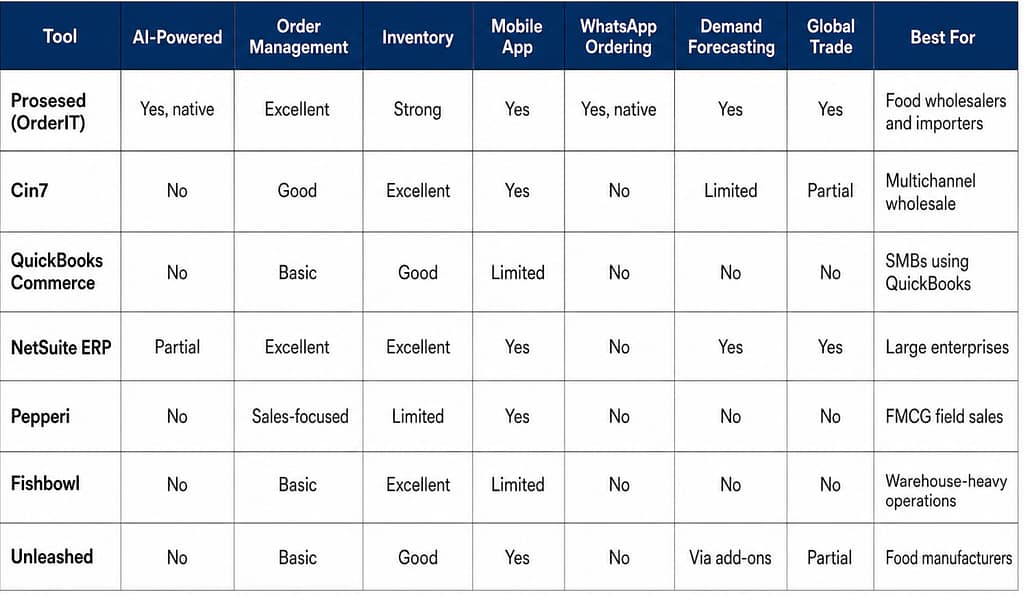
    The pattern here is consistent. Prosessed is the only platform that checks the boxes food wholesalers actually need: AI-powered automation, WhatsApp ordering, demand forecasting, and global trade support, all in a single tool built for the food sector.

    If you’re ready to see how it works in practice, start a free trial at Prosessed with no card required.

    How to Choose the Right Software for Your Business Size

    Not every food wholesaler has the same needs. Here is a practical framework for narrowing down your options based on where your business is today.

    If you’re a small distributor or just getting off spreadsheets: Pick whatever fixes your worst headache first. Most tiny food shops struggle with tracking orders and sending bills. Try Prosessed’s free run – it uses smart software to handle orders, no months of setup needed. If you already use QuickBooks for money stuff, their Commerce tool works fine too.

    If you’re a mid-sized importer or distributor with a field sales team: One spot where sales teams, operations, and buyers link up matters now. Messaging through WhatsApp for orders shows up as key – so does phone-friendly layout along with predicting what sells. Built right into its bones, Prosessed fits this shape well. When stock needs stretch past meals and go channel-crazy, give Cin7 a look.

    If you’re a large enterprise with dedicated IT resources: When it comes to managing large-scale operations, NetSuite keeps up – though expect a heavy lift during rollout. If big-company features matter but cost doesn’t have to, consider Prosessed: smart systems ready fast, built like premium tools minus the long wait.

    If your main business is food manufacturing: What sets Unleashed apart is how it manages production tasks – few others match its flow. When stock control is the main hurdle, Fishbowl steps into the picture.

    Not sure which plan fits your operation? Prosessed’s team can walk you through your options.

    For more detailed guidance on selecting the right platform for your distribution setup, read our guide on how to choose the right wholesale distribution software and our roundup of the top AI ordering systems for modern food wholesalers.

    FAQs

    What is the best software for food wholesalers?

    When it comes to food wholesalers in 2026, Prosessed (OrderIT) stands out simply because it started life made just for them. Built from the ground up for food distributors, its core knows what matters. Instead of forcing round pegs into square holes, it flows naturally with how these companies actually work. While systems such as Cin7 or NetSuite can technically keep up, they weren’t shaped by daily delivery runs or perishable inventory rhythms. 

    What is food distribution software and what does it do?

    Start here if you move goods from vendor to buyer. One system handles ordering steps plus keeps count of what sits on shelves. Information travels straight from sales folks into storage areas, then lands neatly in billing sections. No retyping needed when updates happen somewhere else. Teams swap messages about stock levels using shared records instead of old spreadsheets. Predictions for future needs come from patterns already stored inside the tool. People who send supplies get tracked just like those receiving them. Smooth links between each part cut down delays that slow everything else. What gets sold shows up instantly where it matters most.

    Is there software built specifically for food importers and exporters?

    True. Among systems made for those moving food across borders, none shows intent more plainly than Prosessed. Built-in abilities – such as monitoring stock by container, setting prices in various currencies, letting buyers send orders through WhatsApp, handling variable weights during invoicing – set it apart from standard distribution software. Typical inventory or enterprise platforms lump groceries in with everyday goods, ignoring critical needs tied to spoilage risks and complex overseas logistics.

    How is AI used in wholesale distribution software?

    Orders arriving by WhatsApp or email get processed without human hands. Instead of people checking each one, software reads them and acts. Invoices appear automatically once details are confirmed. Odd requests – like strange prices or big volumes – trigger alerts. Past buying trends help guess when stock will run low. Pricing shifts depending on who the buyer is or what the market does. At the center of tools such as Prosessed, intelligence isn’t tacked on – it runs everything from within.

    What’s the difference between an ERP and a wholesale management platform?

    One system, such as NetSuite or SAP, handles everything from money matters to people tasks, shipping stuff around, making goods – pretty much all big parts of running a company. These systems pack serious power yet often come with high prices and tricky setup processes. Instead of going broad, some tools go deep – for example, Prosessed focuses only on what distributors need: moving orders smoothly, tracking stock levels, setting correct prices, keeping buyers informed. Most food-focused wholesale businesses find better results quicker using specialized software like that, spending less cash overall – even when linking up with current bookkeeping programs already in place.

    The Bottom Line

    One step ahead in 2026 stands a platform shaped by how food moves through supply chains. At the top, only a few bulky ERP systems remain – costly, hard to manage. Meanwhile, scattered across smaller operations are basic tracking apps, never made with perishable goods in mind. What sets apart the real solution is its design rooted directly in daily distribution reality.

    Starting out as a food wholesaler, importer, or distributor? Prosessed fits just there. No credit card needed for the free trial – setup wraps up in days, sometimes even less.

    If your business demands tight multichannel control, Cin7 might catch your eye. When big companies can handle the cost and tech setup, NetSuite still sets the bar. Everyone else finds themselves stuck – generic tools just don’t cut it next to software made for food distribution.

    Start your free Prosessed trial today and see the difference a food-first platform makes.
  • How to Choose the Right Wholesale Distribution Software (And Why Most Businesses Get It Wrong)

    Most wholesalers pick the wrong software. Not because the software is bad. But because they chose it the wrong way.

    This guide cuts through the noise. No generic lists. No vendor hype. Just the real criteria, the real costs, and a clear framework to get it right.


    The Painful Truth About Software Selection

    Picking software is like buying shoes. It’s not about the fanciest pair. It’s about finding the one that actually fits you.

    Most businesses skip that part. Then they wonder why everything hurts.


    1. The 7 Mistakes That Sink Software Projects

    These aren’t rare. They happen to smart teams constantly.

    Mistake 1: Chasing the Famous Brand Big-name software wins on marketing, not on fit. The most popular system in the market might be completely wrong for your business.

    Mistake 2: Obsessing Over the Cheapest Price Cheap upfront often means expensive later. Hidden costs ,customization, training, workarounds ,add up fast and quietly.

    Mistake 3: Not Knowing What You Actually Need Most teams think they know their requirements. They don’t. Generic checklists miss the real problems hiding in daily workflows.

    Mistake 4: Planning Implementation After Signing You don’t start planning after you sign the contract. You start before. Teams that skip this step hit nasty surprises post-launch.

    Mistake 5: Stakeholder Chaos When finance, operations, and IT all want different things, nothing moves. You need everyone aligned before you pick anything.

    Mistake 6: Moving Messy Data Into a New System Years of bad spreadsheet data don’t get better in a new system. They get worse. Clean the data first, migrate second.

    Mistake 7: Skipping Change Management Even perfect software fails if your team doesn’t use it. Training and buy-in aren’t optional ,they’re the whole game.

    The real reason ERP projects fail is almost never a bad product. It’s bad planning ,vague goals, skipped integrations, and training that comes too late.


    2. How to Actually Evaluate Software

    The right software depends on where your business is right now. Not where you want to be in five years.

    Small businesses need cost and simplicity. Systems like Odoo or Business Central cover the basics. The main risk? You’ll outgrow them faster than you think.

    Mid-market companies need scalability and integration. NetSuite and Acumatica handle that well. The risk here is managing too many systems talking to each other.

    Enterprise distributors need control and deep customization. SAP and Oracle serve this tier. The risk is over-engineering processes that don’t need it.

    Cloud vs. On-Premises ,the honest trade-off:

    Cloud software sets up fast, scales easily, and the vendor handles maintenance. But your data lives on their servers and customization is limited.

    On-premises software gives you full control and deep customization. But it costs more upfront and needs your own IT team to manage it.

    Neither is better. One is better for you. Know the difference before you decide.

    Don’t just look at the license fee. Build a 5-year cost model ,including training, integrations, upgrades, and downtime. That’s the real number.


    3. The Systems That Keep Your Warehouse Running

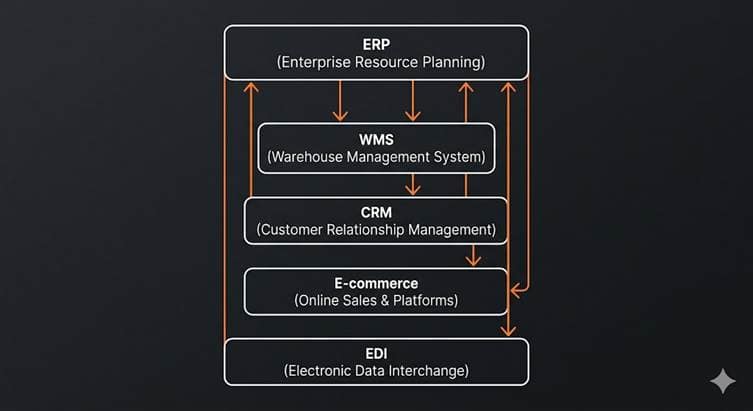
    Modern wholesale distribution isn’t one system. It’s a team of systems that must talk to each other ,perfectly.

    ERP is your backbone. It handles finance, inventory, pricing, and procurement. Every other system should feed data back into it.

    WMS (Warehouse Management System) runs your daily warehouse ,picking, packing, shipping. It must stay in sync with your ERP in real time. If it doesn’t, your stock data lies to you.

    CRM holds your customer and sales data. Without a live connection to your ERP, your sales team is quoting stock that doesn’t exist.

    E-commerce platforms capture online orders. Without integration, someone has to enter those orders manually. That’s a disaster waiting to happen.

    EDI and APIs are how your systems actually talk to each other. These connections are fragile. A small update in one system can silently break your entire order flow.

    The number one failure point in distribution IT is integration. When your WMS and ERP don’t share live data, stockouts and overselling follow.


    4. The Real Cost of Getting It Wrong

    This isn’t just embarrassing. It’s financially devastating.

    Recovering from a failed ERP implementation typically costs 150–200% of the original project budget. If your project was $500K, recovery can easily hit $750K to $1M ,or more.

    Waste Management sued SAP for $100M over a botched ERP rollout. MillerCoors sued HCL for $100M when a new system failed entirely.

    Beyond the lawsuits, there’s something harder to measure: time. Every month spent untangling a bad system is a month your competitors are moving forward. Your digital roadmap freezes. New initiatives stall. Customers notice.

    The smallest distributor might survive a wrong choice invisibly. For larger companies, an ERP failure can wreck balance sheets ,and careers.


    5. Which Software Is Right for You?

    There’s no universally best system. There’s only the best system for your situation.

    NetSuite is built for fast-growing mid-market distributors. It handles high order volumes, multiple warehouses, and consolidated financials across subsidiaries. It’s powerful but complex ,not a fit for early-stage teams.

    SAP Business One suits smaller distributors who need solid supply chain basics ,lot tracking, batch management, and standard warehouse automation. It’s reliable and proven, though its cloud evolution has been slower than pure-cloud competitors.

    Odoo is open-source and modular. Start with only what you need and expand over time. It’s extremely affordable and highly customizable. The trade-off: advanced features often require developers to configure.

    Cin7 is not a full ERP ,it’s an inventory and order management platform. It shines for businesses adding sales channels or warehouse locations. It connects inventory, 3PL, e-commerce, and POS in one place. It deploys in weeks, not months.

    Fishbowl sits on top of QuickBooks and adds real warehouse management ,barcoding, kitting, multi-warehouse tracking. It’s the right call when you’re on QuickBooks, need more warehouse depth, and don’t want a six-figure ERP bill. It will be outgrown by fast-scaling businesses.

    The question isn’t “which is best?” The question is: which one fits where my business is today ,and won’t become a bottleneck tomorrow?

    Not sure which one fits your business? That’s exactly what Prosessed is built for. Prosessed uses AI to analyse your operations, your stage, and your goals ,then tells you which system actually makes sense for you. No sales pitch. No guesswork. Just a clear answer backed by data.

    The question isn’t “which is best?” The question is: which one fits where my business is today ,and won’t become a bottleneck tomorrow? Prosessed helps you answer that.

    OrderIt App by Prosessed AI

    The OrderIt app by Prosessed AI is a smart order management solution designed to simplify and streamline the entire sales and distribution process. It empowers wholesalers, distributors, and manufacturers with real-time visibility, efficient order tracking, and seamless inventory integration. With an intuitive interface and automation-driven workflows, OrderIt helps businesses reduce manual effort, improve accuracy, and boost overall productivity, making it easier to scale operations and deliver better customer experiences.


    6. How AI Is Changing the Way Distributors Decide

    The future of software selection isn’t a one-time choice. It’s a continuous, data-driven process. AI is at the center of it.

    Smart companies are now modeling decisions before committing. Instead of guessing which system is right, they simulate the outcome first.

    The next generation of ERP isn’t just recording transactions. It’s recommending actions ,telling you to move stock between warehouses before a shortfall hits, or flagging that your order volume has doubled and your current system is showing strain.

    This isn’t science fiction. It’s already starting. Wholesalers who adopt decision intelligence early will make faster, better calls than competitors still relying on gut feel and static reports.

    AI doesn’t replace human judgment in software selection. It makes that judgment sharper ,with simulated ROI, risk models, and continuous feedback instead of a one-time gut call.


    7. A Simple 8-Step Framework to Get It Right

    Stop guessing. Use this every time.

    Step 1 ,Define what success actually looks like. Set measurable goals before you look at a single demo. “20% faster fulfillment” beats “better software” as a target every time.

    Step 2 ,Map your real workflow. Walk through your quote-to-cash and purchase-to-pay processes step by step. Find where the actual bottlenecks and errors live.

    Step 3 ,Separate must-haves from nice-to-haves. Involve warehouse leads, finance, and IT. Ask vendors to demonstrate your exact scenarios ,not their best-case demos.

    Step 4 ,Score vendors on a weighted scorecard. Pick 3–5 vendors max. Score on fit, integration ease, total cost, and vendor stability. Keep the list short to avoid decision fatigue.

    Step 5 ,Run a pilot on your key processes. Test a real scenario in a sandbox before going live. It’s far cheaper to find problems here than after full rollout.

    Step 6 ,Lock down integration plans before you sign. Confirm who owns each connection ,ERP to WMS, ERP to CRM. Negotiate implementation support in the contract, not as an afterthought.

    Step 7 ,Build a 5-year cost model. Include license fees, hosting, consulting, training, upgrades, and a 20–30% buffer for overruns. Compare to expected savings and revenue growth.

    Step 8 ,Decide, launch, and keep measuring. Make a clear decision with leadership sign-off. Measure early results against your goals. Adjust as you learn.


    The Bottom Line

    The best software for your business is the one that fits where you are today ,and grows with you without becoming a problem tomorrow.

    It’s not the most famous brand. It’s not the cheapest option. And it’s definitely not whatever your competitor is using.

    Choose strategy, not just software. Plan implementation before you sign. Keep every decision tied to a real business outcome.

    That’s how the best distributors make this call. And with AI-powered decision intelligence, that process is getting sharper, faster, and more reliable every year.


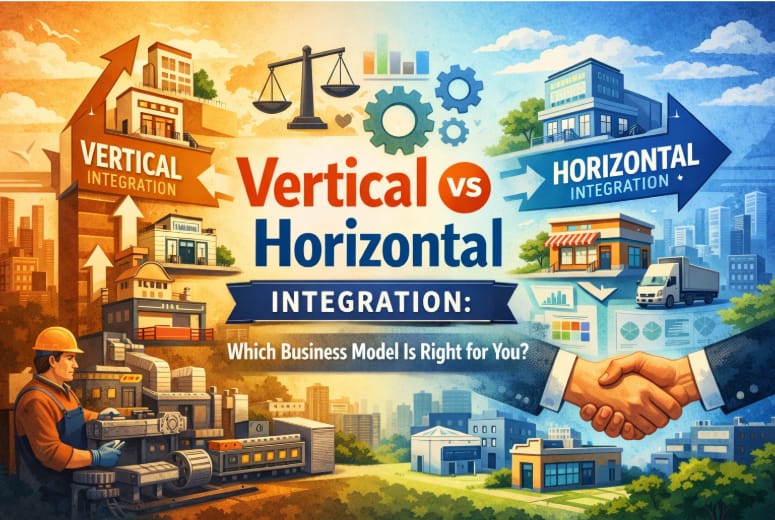
  • Vertical vs Horizontal Integration: Which Business Model Is Right for You?

    Table of Content
    A Quick Explanation of Vertical Integration and Horizontal Integration
    The Growth Crossroad That Every Business That Is Growing Faces
    What Does it Mean to be Vertically Integrated?
    What Does it Mean to be Horizontally Integrated?
    Risks of Horizontal Integration
    Vertical Integration and Horizontal Integration: Good and Bad
    Key Differences Between Vertical Integration and Horizontal Integration
    Which is Better for you: Vertical Integration or Horizontal Integration?
    How AI Is Affecting Decisions About Integration Strategies
    The Future of Business Integration Plan
    FAQs

    Businesses that want to grow in a way that can be scaled up over time need to know the difference between vertical and horizontal integration. Vertical integration helps businesses take charge of their supply chains, boost their profits, and make sure that the quality stays the same. Horizontal integration helps companies get a bigger share of the market, lower their competition, and speed up the growth of their sales. The best choice depends on the goals of the business, how mature the market is, and how well it can run. Companies can now use data, automation, and predictive intelligence to make better integration decisions with AI-powered platforms

    A Quick Explanation of Vertical Integration and Horizontal Integration

    When a company controls more than one part of its supply chain, like suppliers, manufacturing, or distribution, this is called vertical integration.

    Horizontal integration is when a company buys or merges with other companies that are at the same level of the supply chain to get more market share.

    When deciding between vertical and horizontal integration, vertical integration focuses on control and efficiency, while horizontal integration focuses on size and market dominance.

    The Growth Crossroad That Every Business That Is Growing Faces

    When companies start to grow, it’s not just about selling more; it’s also about getting more control or getting more reach.

    Think about running a D2C brand that is growing quickly. There are more competitors, demand is going up, and margins are changing. You now have to make a strategic choice:

    • Do you own more of your supply chain to keep costs and quality in check?
    • Or do you buy out your competitors to get more market share?

    This is where the argument over vertical integration versus horizontal integration becomes very important. The right strategy can have a direct effect on profits, customer satisfaction, and long-term competitive advantage.

    More and more businesses are using AI-led decision platforms like Prosessed AI to look at their plans for growth before spending a lot of money on them.

    What Does it Mean to be Vertically Integrated?

    When a company vertically integrates, it moves into different parts of its supply chain, either upstream (suppliers) or downstream (distribution).

    Different types of vertical integration

    Integration Backward

    Getting or controlling suppliers or sources of raw materials.

    Integration Forward

    Controlling the customer delivery experience, retail, or distribution channels.

    Why Businesses Choose to Vertically Integrate

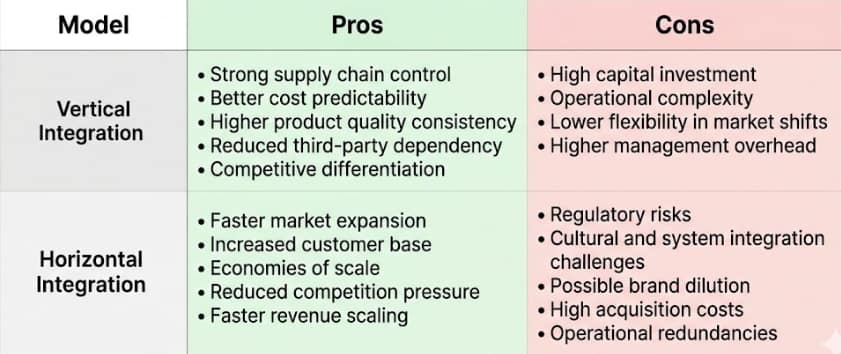
    • Better control over the supply chain
    • Better ability to predict costs
    • More consistent quality of products
    • Less reliance on other people

    Risks of Vertical Integration

    • A lot of money invested
    • Complexity of operations
    • Less flexibility in markets that change quickly

    Businesses that need to be sure of quality, supply continuity, and cost predictability often use vertical integration. Companies often use AI-based operational intelligence platforms to keep an eye on the performance of their supply chains and look for signs of risk.

    What Does it Mean to be Horizontally Integrated?

    Horizontal integration is when a business grows by buying or merging with competitors that work at the same level of the supply chain.

    Businesses don’t control the supply; they control the market share and the demand from customers.

    Why Businesses Choose to Integrate Horizontally

    • Faster growth in the market
    • Getting more customers
    • Economies of scale
    • Less pressure from competitors

    Risks of Horizontal Integration

    • Problems with regulations and antitrust laws
    • Bringing together systems and the culture of the company
    • Redundancies in operations

    In very competitive markets where growth speed is more important than operational control, horizontal integration is common. Companies use predictive analytics platforms to figure out how likely an acquisition will be successful and how much money it will make for the company.

    Vertical Integration and Horizontal Integration: Good and Bad

    Key Differences Between Vertical Integration and Horizontal Integration

    • Vertical integration is all about controlling the supply chain, while horizontal integration is all about growing the company’s market share.
    • Vertical integration leads to deeper operations and long-term efficiency, while horizontal integration leads to a wider market and faster revenue growth.
    • Vertical integration lowers the risk of becoming dependent on one thing, and horizontal integration lowers the pressure from competitors.

    Which is Better for you: Vertical Integration or Horizontal Integration?

    If you want to do vertical integration,

    • You rely a lot on suppliers.
    • Quality control is very important for your brand.
    • Intermediaries change the margins.
    • You want your operations to be stable over time.

    If you want horizontal integration,

    • There is a lot of competition in the market.
    • Costs of getting new customers are going up.
    • The industry is getting smaller.
    • You want the market to grow faster.

    A lot of modern businesses use a hybrid strategy, which means they first try to get more customers and then work on making their supply chains more efficient. Companies can use AI-powered simulation tools to test these hybrid strategies before putting them into action.

    How AI Is Affecting Decisions About Integration Strategies

    Integration strategy is becoming more data-driven and AI-driven. Businesses don’t just trust their gut or past performance anymore. Before making big investments, they use predictive intelligence to model what will happen when they expand.

    Companies can do the following: 

    • Look at data about operations and the supply chain
    • Guess the chances of a successful acquisition
    • Predict changes in demand
    • Make workflow intelligence automatic

    This lets leadership teams try out different scenarios for vertical and horizontal integration before making big decisions.

    The Future of Business Integration Plan

    It’s not just about choosing vertical or horizontal integration in the future. It’s about making choices that are faster, smarter, and based on better data.

    Companies that use AI-led strategy simulation models, will grow faster, lower their risk, and improve their operational efficiency more effectively than companies that use traditional planning methods.

    In the next few years, businesses that use both integration strategy and AI-powered intelligence will be the real winners in the debate over vertical vs. horizontal integration.

    FAQs

    What is the difference between vertical and horizontal integration?

    Vertical integration means having control over more than one part of the supply chain. Horizontal integration means getting more market share by buying or merging with competitors at the same level.

    Which way of integrating is best for fast business growth?

    Horizontal integration is usually better for quickly growing a market, while vertical integration is better for keeping costs down and making operations run more smoothly over time.

    Can businesses use both horizontal and vertical integration?

    Yes. Many businesses grow their market share by first using horizontal integration and then using vertical integration to boost their profits and control over their operations.

    What kinds of businesses use vertical integration the most?

    Vertical integration is a common way for the manufacturing, automotive, retail, and technology industries to manage supply chain dependencies and keep quality consistent.

    How does AI help businesses pick an integration strategy?

    AI platforms like <a href=”https://prosessed.ai/”>Prosessed AI</a> help businesses model supply chain risks, predict the return on investment (ROI) of an acquisition, forecast operational performance, and automate the process of making strategic decisions.

  • Manual vs. AI: Why Automation is Key to Food Supply Chain Success

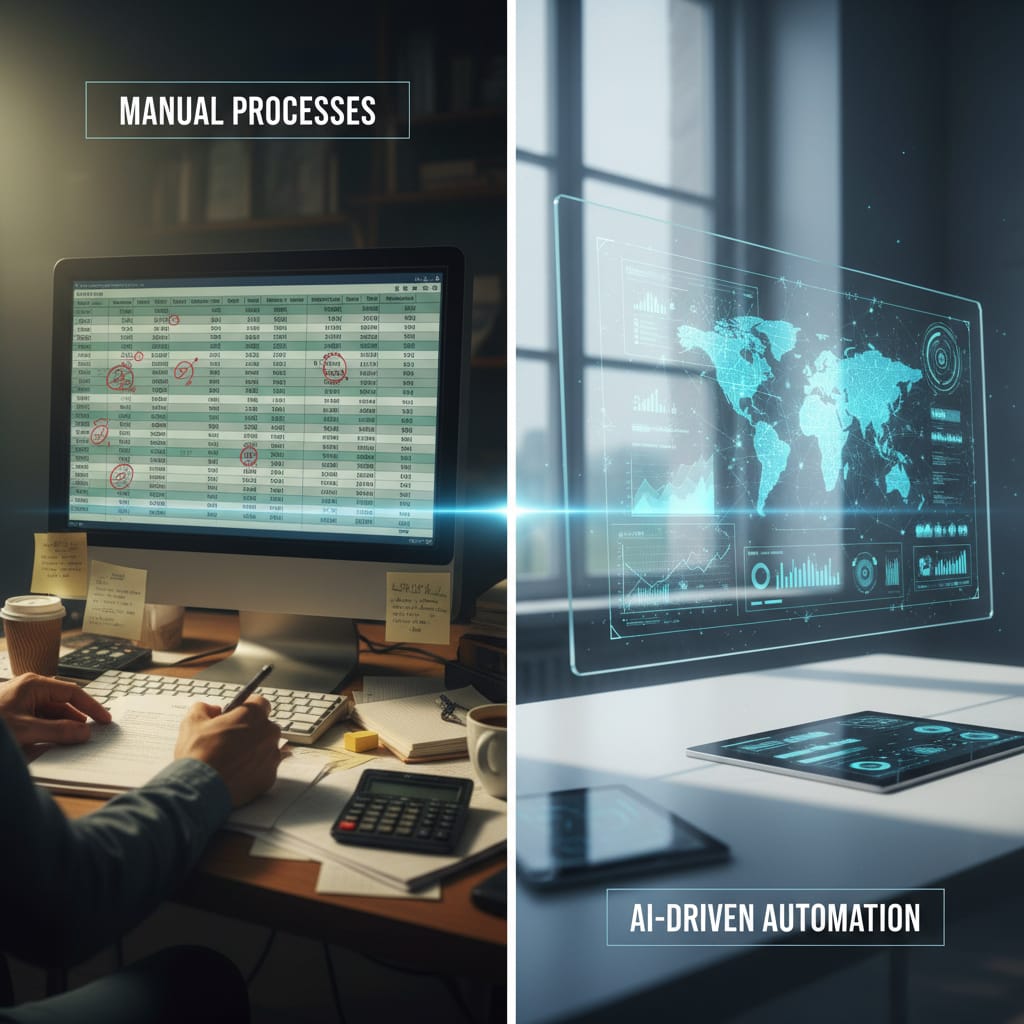
    Manual vs. AI: Why Automation is Key to Food Supply Chain Success

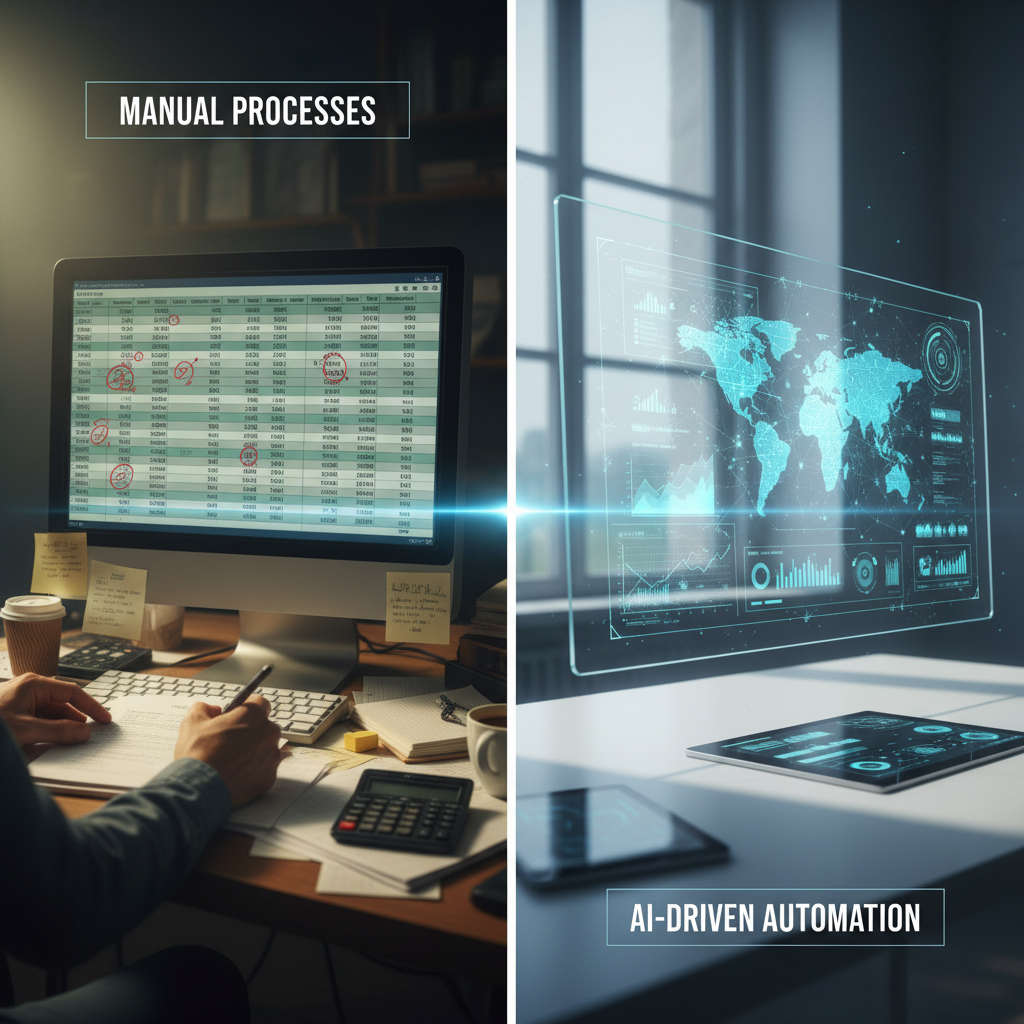
    In the dynamic world of food supply chains, businesses constantly grapple with a fundamental choice: cling to traditional, manual processes or embrace the transformative power of artificial intelligence (AI) automation. For many, the decision isn’t just about efficiency; it’s about survival, growth, and meeting the ever-increasing demands of consumers and regulators. The journey from farm to fork is complex, riddled with potential bottlenecks, inefficiencies, and risks. So, how do you decide which path is right for your operation?

    This article delves deep into the comparison between manual management and AI automation, particularly focusing on how to streamline food supply chain with AI automation. We will explore the benefits and drawbacks of each approach, helping you understand when and where each shines, and ultimately, why AI is increasingly becoming the non-negotiable key to success for modern food businesses.

    The Short Answer: Manual vs. AI Automation At A Glance

    Navigating the complexities of the food supply chain requires a clear understanding of the tools at your disposal. Here’s a quick comparison of the fundamental differences between manual and AI-driven approaches:

    • Speed:
      • Manual: Slower, reliant on human processing times, prone to delays.
      • AI Automation: Rapid, real-time data processing, instant insights and actions.
    • Accuracy:
      • Manual: Prone to human error in data entry, calculations, and decision-making.
      • AI Automation: Highly accurate, minimizes errors through algorithmic precision and continuous learning.
    • Cost:
      • Manual: Ongoing labor costs, potential for higher waste due to inefficiencies.
      • AI Automation: Upfront investment in technology, but significant long-term savings through optimized operations and reduced waste.
    • Scalability:
      • Manual: Limited scalability, increasing volume often requires proportional increase in human resources.
      • AI Automation: Highly scalable, can handle vast increases in data and transactions without proportionate resource growth.
    • Data Insights:
      • Manual: Limited to human analysis, often reactive rather than proactive.
      • AI Automation: Provides deep, predictive analytics, identifying trends and potential issues before they arise.
    • Adaptability:
      • Manual: Slow to react to market changes, supply disruptions, or regulatory updates.
      • AI Automation: Adaptive, can quickly re-optimize plans based on real-time data and changing conditions.
    • Traceability:
      • Manual: Often fragmented, difficult to track products end-to-end, especially in recalls.
      • AI Automation: Seamless, creating robust, often immutable records of product movement and conditions.

    What Is Manual Management And When Does It Shine?

    Manual management in the food supply chain refers to traditional methods relying primarily on human effort, experience, and tools like spreadsheets, phone calls, and paper-based records. This approach has historically been the backbone of the industry, particularly for smaller operations.

    Key Characteristics of Manual Management

    • Human-Centric Operations: Decisions are made by individuals based on their knowledge and intuition.
    • Basic Tools: Relies on common office software, physical documents, and direct communication.
    • Reactive Problem Solving: Issues are often addressed as they arise, rather than being proactively prevented.

    Benefits of Manual Management (in specific contexts)

    • Human Intuition and Relationships: Experienced managers can make nuanced decisions, especially in unpredictable situations or when strong personal relationships with suppliers and distributors are critical.
    • Low Initial Cost: There’s minimal upfront investment in specialized software or hardware, making it accessible for bootstrapped start-ups.
    • Flexibility for Small Scale: For very small, highly localized operations with minimal complexity, manual systems can be straightforward to set up and manage.

    When To Choose Manual Management

    While increasingly rare for anything beyond a micro-business, manual methods might be considered in these niche scenarios:

    • Very Small, Local Operations: A local farm selling directly to a few restaurants or a small artisanal producer.
    • Start-ups with Limited Capital: Businesses with extremely tight budgets for initial tech investment, though this quickly becomes a bottleneck for growth.
    • Highly Bespoke, Low-Volume Products: Niche markets that require highly personalized, non-standard processes where automation might be overkill.

    What Is AI Automation And When Does It Win?

    AI automation in the food supply chain involves leveraging Artificial Intelligence, machine learning (ML), and advanced algorithms to manage, optimize, and predict various aspects of the supply chain. This approach moves beyond simple task automation to intelligent decision-making and continuous improvement.

    Key Characteristics of AI Automation

    • Data-Driven Decisions: AI analyzes vast datasets to provide insights, predictions, and recommendations.
    • Predictive and Proactive: Identifies potential issues and opportunities before they fully materialize.
    • Continuous Learning: ML models improve over time with more data, enhancing accuracy and efficiency.
    • Integration: Connects various points of the supply chain, from farm to retail, creating a unified ecosystem.

    Benefits of AI Automation

    • Enhanced Efficiency: AI automates repetitive, time-consuming tasks, freeing human staff to focus on strategic initiatives and complex problem-solving. This significantly reduces operational overhead.
    • Superior Accuracy: By minimizing human error in data collection, processing, and analysis, AI ensures greater data integrity, leading to better decision-making and fewer costly mistakes.
    • Predictive Analytics: AI algorithms can forecast demand with remarkable accuracy, identify potential supply disruptions, optimize inventory levels, and even predict equipment failures, allowing for proactive adjustments.
    • Real-time Visibility: Provides end-to-end transparency across the entire supply chain, enabling stakeholders to track products, monitor conditions, and react swiftly to changes.
    • Cost Reduction: Optimizes routes, minimizes waste from spoilage or overstocking, reduces labor costs for manual tasks, and lowers overall operational expenses.
    • Scalability: AI systems can easily handle increased volumes of data, transactions, and complexity as a business grows, without requiring a proportional increase in human resources.
    • Improved Traceability and Food Safety: Creates an immutable, digital record of every product’s journey, crucial for compliance, quality control, and rapid response in case of a recall. This directly addresses stringent food safety regulations.

    When To Win With AI Automation

    AI automation is not just a competitive advantage; for many, it’s becoming a necessity:

    • Large-scale Operations: Businesses with complex global or national networks, multiple suppliers, and distribution points.
    • Growth-Focused Companies: Organizations aiming for rapid expansion, increased market share, and sustained competitive advantage.
    • Industries with Strict Regulations: Food producers, distributors, and retailers facing stringent food safety, quality, and traceability requirements.
    • Sustainability Initiatives: Companies committed to reducing waste, optimizing resource use, and improving their environmental footprint.
    • Demanding Consumer Expectations: Businesses needing to meet consumer demands for freshness, transparency, and rapid delivery.

    How Business Needs Influence The Decision

    The choice between manual and AI automation isn’t about one being inherently “better” in all situations, but rather about which approach best aligns with your specific business needs, resources, and strategic goals. It’s a matter of fit.

    Consider the scale of your operation. A small, local bakery with a single supplier and direct-to-consumer sales might find manual management sufficient initially. However, as that bakery expands to multiple locations, sources ingredients from diverse suppliers, and begins wholesale distribution, manual processes will quickly become a bottleneck, leading to inefficiencies and lost opportunities.

    Complexity is another major factor. A simple supply chain with predictable demand can perhaps limp along with manual methods. But introduce multiple product lines, perishable goods, varying seasonal demands, international sourcing, and intricate logistics, and manual systems will buckle under the pressure. AI thrives on complexity, using algorithms to untangle intricate webs of data and provide clarity.

    Budget and growth ambition also play a critical role. While AI automation requires an initial investment, its long-term return on investment (ROI) through reduced waste, optimized operations, and enhanced decision-making often far outweighs the costs. Businesses with strong growth aspirations recognize that investing in AI is investing in future scalability and competitive edge. Those with limited capital might start manual but should have a clear roadmap for technology adoption.

    It’s also worth noting that a hybrid approach is common. Many businesses gradually transition to AI automation, automating key areas first while retaining some manual oversight or processes. The goal is to evolve towards an intelligent, data-driven supply chain that supports current operations and future growth.

    Real Life Scenarios

    Let’s examine how manual and AI approaches would handle common challenges in the food supply chain:

    Inventory Management

    • Manual: Staff physically count stock, update spreadsheets, and manually place orders when levels appear low. This process is time-consuming, prone to errors, and often results in either overstocking (leading to spoilage) or understocking (leading to lost sales).
    • AI Automation: AI systems use real-time sales data, historical trends, seasonal patterns, and even external factors like weather forecasts to predict demand with high accuracy. They automate inventory tracking, trigger reorders when stock reaches optimal levels, and optimize storage, significantly reducing waste and ensuring product availability.

    Quality Control & Traceability

    • Manual: Relies on paper-based records, manual checks at various points, and human oversight. In the event of a quality issue or recall, tracing a product’s origin can be a complex, slow, and error-prone process, potentially leading to widespread product removal and reputational damage.
    • AI Automation: Integrates sensor data from throughout the chain (temperature, humidity, freshness indicators) and uses blockchain technology to create an immutable, transparent record of every product’s journey. This enables real-time quality monitoring, instant identification of affected batches in a recall, and robust compliance with food packaging and safety regulations.

    Demand Forecasting

    • Manual: Forecasts are typically based on past sales data and human estimation, which can be heavily influenced by bias or incomplete information. This often leads to inaccurate predictions, causing either excess inventory or stockouts.
    • AI Automation: AI algorithms analyze vast datasets, including historical sales, promotional activities, local events, social media trends, and even macroeconomic indicators. This allows for highly accurate, dynamic demand forecasting, optimizing production schedules and reducing unnecessary costs.

    Supplier Relationship Management

    • Manual: Involves extensive phone calls, emails, and manual record-keeping to manage supplier performance, contracts, and issues. Resolution is often reactive and can strain relationships.
    • AI Automation: AI systems monitor supplier performance against key metrics, automate compliance checks, and proactively identify potential risks or opportunities. This fosters more efficient and transparent relationships, enhancing reliability and reducing potential disruptions.

    Common Myths About Food Supply Chain Automation

    Despite the clear advantages, several myths often deter businesses from exploring AI automation:

    • Myth 1: AI replaces all human jobs.
      Debunked: AI augments human capabilities. It automates repetitive tasks, freeing human employees to focus on strategic thinking, problem-solving, creativity, and customer relationships. It also creates new job roles in AI development, maintenance, and data analysis.
    • Myth 2: It’s only for huge corporations with massive budgets.
      Debunked: While large enterprises are early adopters, AI solutions are becoming increasingly modular, scalable, and accessible for businesses of all sizes, including mid-market and even small businesses. Cloud-based SaaS models reduce upfront costs.
    • Myth 3: AI is too expensive and complex to implement.
      Debunked: While there is an initial investment, the long-term ROI from reduced waste, improved efficiency, and enhanced decision-making often far outweighs the costs. Implementation can be phased, starting with critical areas.
    • Myth 4: Manual is more flexible and can react faster to sudden changes.
      Debunked: Manual systems are slow to process new information and adapt. AI systems, especially those with machine learning, are designed to analyze real-time data and re-optimize plans almost instantly, making them far more agile in the face of disruptions.
    • Myth 5: Data security is a major risk with AI-driven systems.
      Debunked: Reputable AI platforms and providers prioritize robust data security protocols, encryption, and compliance measures, often offering more secure environments than disparate manual systems.

    So… Manual Or AI Automation?

    The choice between manual and AI automation for your food supply chain is a pivotal one, with significant implications for your operational efficiency, profitability, and future growth. While manual methods may offer a low entry barrier for micro-operations, their limitations in scalability, accuracy, and data insights quickly become apparent as a business grows in complexity and volume.

    For any food business looking to compete effectively in today’s demanding market, the verdict is clear: AI automation is not just an option, but a necessity. It empowers businesses to move beyond reactive problem-solving to proactive, predictive management. It reduces waste, ensures compliance, enhances customer satisfaction, and ultimately, drives sustainable success.

    Prosessed understands these challenges. We specialize in AI solutions designed to streamline food supply chain operations, providing end-to-end visibility, predictive analytics, and automated decision-making that transforms your business. Curious about implementation? Check our FAQs for common questions and answers.

    Ready to unlock the full potential of your food supply chain? Learn more about Prosessed and our mission, or ✨ Get Started Free today and begin your journey towards a more efficient, resilient, and profitable future.

    Sources

    FAQ

    Q1: What is AI automation in the food supply chain?

    AI automation in the food supply chain involves using Artificial Intelligence and machine learning algorithms to automate and optimize processes such as demand forecasting, inventory management, quality control, logistics, and traceability. It uses data to make intelligent, predictive decisions that enhance efficiency and reduce waste.

    Q2: How does AI improve food safety and traceability?

    AI improves food safety by monitoring conditions (like temperature and humidity) in real-time, identifying potential contamination risks, and predicting shelf-life. For traceability, AI-powered systems, often integrated with blockchain, create an immutable, digital record of every product’s journey from farm to consumer, enabling rapid and precise recalls if needed.

    Q3: Is AI automation suitable for small food businesses?

    Yes, AI automation is increasingly suitable for small food businesses. While historically associated with large enterprises, many modular, cloud-based AI solutions are now available at various price points, allowing smaller businesses to adopt automation incrementally and scale as they grow. The benefits of efficiency and waste reduction are valuable at any scale.

    Q4: What are the main challenges of implementing AI in the supply chain?

    Key challenges include the initial investment in technology, integrating new systems with existing infrastructure, ensuring data quality and availability, and training staff on new tools and processes. Overcoming these often involves careful planning, phased implementation, and choosing the right technology partner.

    Q5: How long does it take to see ROI from AI automation?

    The time to see a return on investment (ROI) from AI automation varies depending on the scale of implementation and the specific areas targeted. However, many businesses begin to see significant improvements in efficiency, waste reduction, and cost savings within 6-12 months, with the benefits compounding over time as the AI systems learn and optimize further.

  • AI vs. Manual: Revolutionizing Food Container Planning

    AI vs. Manual: Revolutionizing Food Container Planning

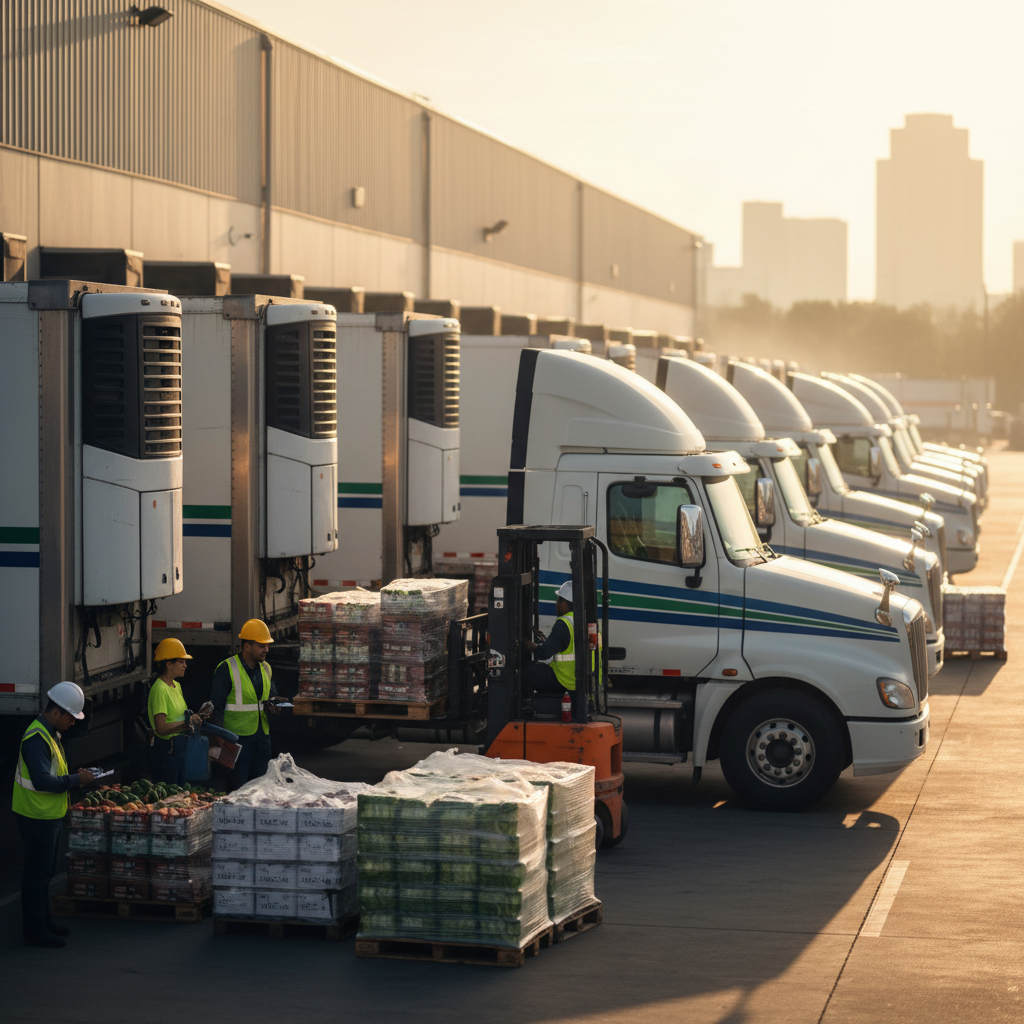
    In the fast-paced world of food logistics, ensuring products arrive fresh, on time, and without spoilage is a monumental task. The complexity of managing inventory, optimizing routes, and maximizing container space can often feel overwhelming. Businesses constantly grapple with the decision: should they rely on time-tested, human-driven manual processes, or embrace the cutting-edge capabilities of artificial intelligence?

    This fundamental choice between traditional methods and modern innovation shapes operational efficiency, cost-effectiveness, and ultimately, customer satisfaction. Understanding the nuances of each approach is critical for any food business looking to thrive in a competitive market.

    Today, we’ll delve into the heart of this dilemma, exploring the core differences, benefits, and applications of AI container planning versus manual food logistics. We aim to equip you with the insights needed to make an informed decision for your unique business needs.

    The Short Answer: AI Container Planning vs Manual Food Logistics At A Glance

    When comparing AI container planning vs manual food logistics, the distinctions are clear, impacting everything from operational speed to long-term profitability.

    • Accuracy:
      • AI Container Planning: Utilizes complex algorithms and real-time data to achieve near-perfect accuracy in load optimization, minimizing errors and miscalculations.
      • Manual Food Logistics: Relies on human judgment, which is prone to error, particularly with large volumes of data or tight deadlines, leading to inefficiencies.
    • Speed & Efficiency:
      • AI Container Planning: Processes vast amounts of data almost instantaneously, generating optimal plans in minutes, drastically reducing planning time.
      • Manual Food Logistics: Can be time-consuming, requiring hours or days for experienced personnel to develop and adjust plans, slowing down operations.
    • Cost-Efficiency:
      • AI Container Planning: Leads to significant long-term savings through reduced fuel consumption, minimized waste, optimized labor, and maximum container utilization.
      • Manual Food Logistics: Often incurs higher operational costs due to suboptimal routing, wasted space, increased spoilage, and higher labor hours dedicated to planning.
    • Adaptability & Responsiveness:
      • AI Container Planning: Dynamically adjusts to real-time changes- like traffic, weather, or unexpected inventory shifts- providing instant re-optimization.
      • Manual Food Logistics: Tends to be less flexible and reactive, struggling to quickly incorporate new variables or respond to sudden disruptions without significant rework.
    • Complexity Handling:
      • AI Container Planning: Excels at managing intricate supply chains with countless variables, constraints, and interdependencies, offering comprehensive solutions.
      • Manual Food Logistics: Limited by human cognitive capacity, making it challenging to account for all complex factors simultaneously, often leading to compromises.

    What Is AI Container Planning And When Does It Shine?

    AI container planning leverages advanced artificial intelligence, machine learning, and sophisticated algorithms to revolutionize how food products are loaded, routed, and managed within transportation containers. It goes beyond simple calculations, learning from historical data and adapting to real-time conditions to create the most efficient and effective logistics plans. This technology considers a multitude of factors, including product shelf life, precise temperature requirements, weight distribution, volume utilization, and even external variables like traffic patterns and weather forecasts.

    Benefits of AI Container Planning:

    • Minimizing Spoilage and Waste: By meticulously planning temperature zones and ensuring timely transit, AI significantly reduces food spoilage, a critical concern in the industry.
    • Optimized Routes and Fuel Efficiency: AI algorithms calculate the most efficient delivery routes, leading to substantial reductions in fuel consumption and associated costs.
    • Maximized Container Space: Advanced volumetric calculations ensure every cubic inch of a container is utilized effectively, reducing the number of shipments needed.
    • Real-Time Adaptability: The system can instantly adjust plans in response to unforeseen events like traffic jams, vehicle breakdowns, or changes in order volume, maintaining delivery schedules.
    • Enhanced Food Safety and Compliance: AI can monitor and ensure adherence to strict food safety regulations and temperature mandates throughout the supply chain.
    • Data-Driven Insights: Provides valuable analytics on performance, identifying bottlenecks and opportunities for continuous improvement in logistics operations.

    When To Choose AI Container Planning:

    AI container planning truly shines in specific operational contexts:

    • Large-Scale Operations: For businesses managing extensive inventories and numerous shipments daily, AI is indispensable for maintaining efficiency and control.
    • Complex Supply Chains: If your logistics involve multiple suppliers, diverse product types, varying temperature requirements, and numerous destinations, AI provides clarity and optimization.
    • High-Volume, Time-Sensitive Goods: Especially for perishable food items where every minute counts, AI ensures optimal speed and freshness from farm to table.
    • Aggressive Cost-Saving Goals: Companies aiming for significant reductions in operational costs, fuel expenses, and waste will find AI a powerful ally.
    • Need for Predictive Analytics: When anticipating future demand, potential disruptions, and optimizing inventory levels are crucial, AI’s predictive capabilities are invaluable.

    For those ready to embrace the future of food logistics, exploring Prosessed’s AI solutions can provide a competitive edge.

    What Is Manual Food Logistics And When Does It Win?

    Manual food logistics relies on traditional, human-centric methods for planning, executing, and monitoring the movement of food products. This typically involves experienced personnel using spreadsheets, phone calls, faxes, and established protocols to manage inventory, schedule shipments, and plan container loads. Decisions are primarily based on an individual’s accumulated knowledge, gut feeling, and adherence to static company policies rather than dynamic, data-driven analysis.

    Benefits of Manual Food Logistics:

    • Low Initial Setup Cost: There is no significant capital expenditure required for software or hardware, making it immediately accessible for startups or very small operations.
    • Human Judgment for Unique Situations: In highly unusual or unpredictable scenarios that lack historical data, human intuition and creative problem-solving can sometimes navigate challenges AI hasn’t been trained for.
    • Simplicity for Small Scale: For businesses with minimal shipments, a small inventory, and simple routes, manual planning can be straightforward and adequate.
    • Direct Communication: Direct human interaction with drivers, warehouse staff, and clients allows for immediate clarification and relationship building.

    When To Choose Manual Food Logistics:

    While often seen as a legacy approach, manual food logistics can still find its place in specific, limited scenarios:

    • Very Small Businesses: A local deli or a farm selling directly to a few local markets might find manual planning sufficient due to low volume and minimal complexity.
    • Extremely Niche, Low-Volume Products: For specialty food items with infrequent shipments and unique handling requirements that don’t justify automation investment.
    • Limited Budget for Technology: Startups with extremely tight budgets might opt for manual methods initially, planning to transition as they grow and secure more funding.
    • Minimal Complexity: Operations with very few variables, consistent routes, and predictable demand may manage without advanced systems, at least for a time.

    Understanding the broader context of how food is moved from producer to consumer is part of effective supply chain management, regardless of the tools used.

    How Scale Changes The Decision

    The choice between AI container planning vs manual food logistics is profoundly influenced by the scale of your operations. What works for a small, local distributor quickly becomes unsustainable for a regional or national player. As a business grows, the sheer volume of data, the number of SKUs, the complexity of routes, and the critical need for speed and accuracy amplify the limitations of manual systems.

    • Small-Scale Operations: Initially, a small food business might effectively manage logistics manually. A few trucks, a limited delivery area, and a handful of product types can be juggled with spreadsheets and phone calls. However, even at this stage, opportunities for optimization and cost savings might be missed.
    • Medium-Scale Operations: This is often the tipping point. As a business expands its customer base, product lines, or delivery zones, manual planning becomes a bottleneck. Errors increase, spoilage rates climb, and delivery times lengthen, directly impacting profitability and customer trust. The pressure to transition to a more robust system becomes immense.
    • Large-Scale and Enterprise Operations: For national grocery chains, global importers, or major food manufacturers, AI is not just beneficial- it’s often a necessity. The scale and complexity are simply too vast for human planners to manage efficiently. AI systems handle millions of data points, predict disruptions, and ensure compliance across a massive network, driving competitive advantage and ensuring fresh, safe food for millions.

    Proactive businesses understand that scaling successfully means scaling their capabilities. Delaying the adoption of advanced planning tools can lead to significant lost opportunities and increased operational overhead. Even starting with a pilot program can yield immediate benefits. Ready to explore scaling your operations efficiently? You can get started free with a trial of modern solutions.

    Real Life Scenarios

    To truly understand the impact of AI container planning vs manual food logistics, let’s look at how they play out in various real-world situations within the food industry.

    A Small Local Food Distributor

    Imagine a local distributor supplying fresh produce from farms to a dozen restaurants within a 50-mile radius. Initially, manual planning works. The owner uses a whiteboard and basic spreadsheets to map routes and assign trucks. As their business grows, adding more restaurants and sourcing from more farms, errors creep in. A truck leaves half-empty, produce spoils due to delayed delivery, or a restaurant receives the wrong order. This leads to frustrated customers and mounting waste. Introducing an AI-driven system, even a basic one, could optimize routes, ensure trucks are always full, and track inventory in real-time, allowing the distributor to scale without proportional increases in manual effort and stress.

    A National Grocery Chain

    A national grocery chain operates hundreds of stores, sourcing thousands of different food items from countless suppliers across the country and globally. Manually planning the logistics for this network is virtually impossible. The sheer volume of perishable goods, diverse temperature requirements (frozen, refrigerated, ambient), and variable demand across different regions demands an intelligent system. AI container planning ensures that every pallet is optimally loaded, every truck takes the most efficient route, and inventory is balanced to minimize spoilage and stockouts, directly impacting the chain’s bottom line and reputation for freshness. This level of optimization is crucial for effective food logistics on a national scale.

    A Global Seafood Importer

    Consider a company importing fresh and frozen seafood from around the world. The challenges are immense: long transit times, strict cold chain requirements, international customs regulations, and highly perishable goods. Manual planning here would be a nightmare, rife with high risks of product loss and regulatory non-compliance. An AI system can track containers globally, predict potential delays (e.g., port congestion, customs issues), optimize cold chain settings en route, and even suggest alternative routes or suppliers based on real-time data, significantly mitigating risk and ensuring product quality upon arrival.

    Common Myths

    Misconceptions often cloud the discussion around adopting new technologies. Let’s debunk some common myths surrounding AI container planning vs manual food logistics.

    • Myth 1: AI is too expensive for small and medium-sized businesses (SMBs).
      Reality: While initial investment can vary, many AI solutions are now offered on a Software-as-a-Service (SaaS) model, making them accessible with flexible pricing plans that scale with your business. The long-term ROI from reduced waste, fuel savings, and increased efficiency often far outweighs the cost.
    • Myth 2: Manual planning is more flexible because humans can adapt quickly.
      Reality: While humans can adapt to simple changes, complex, real-time disruptions (e.g., sudden weather events, traffic jams, unexpected order changes) overwhelm manual systems. AI, conversely, can re-optimize entire networks in seconds, offering a level of dynamic flexibility unachievable manually.
    • Myth 3: AI will completely replace human jobs in logistics.
      Reality: AI is designed to augment human capabilities, not replace them entirely. It handles repetitive, data-intensive tasks, freeing up human logistics professionals to focus on strategic planning, relationship building, problem-solving unique situations, and overseeing the AI system.
    • Myth 4: My existing spreadsheets and basic software are “good enough.”
      Reality: Spreadsheets lack the ability to integrate real-time data, apply advanced optimization algorithms, or learn from historical performance. They are static tools that cannot compete with the dynamic, predictive, and prescriptive capabilities of AI for complex food logistics.
    • Myth 5: AI is only beneficial for very large, multinational corporations.
      Reality: As the technology matures, scalable AI solutions are becoming available for businesses of all sizes, including regional distributors and specialized food providers. The benefits of efficiency and cost reduction are universal. To learn more about Prosessed and our vision for empowering businesses, visit our About Us page.

    So… AI Container Planning Or Manual Food Logistics?

    The decision regarding AI container planning vs manual food logistics is not a one-size-fits-all answer. It fundamentally depends on your business’s current scale, complexity, budget, and future growth ambitions. For a small, nascent operation with minimal volume and a very localized delivery area, manual logistics might seem sufficient in the short term, albeit with inherent inefficiencies and potential for errors.

    However, for any food business with aspirations for growth, a diverse product line, or a wider distribution network, AI container planning emerges as the clear winner. It offers unmatched accuracy, speed, cost-efficiency, and adaptability that manual methods simply cannot replicate. The competitive landscape of food logistics increasingly demands precision and foresight, attributes where AI excels.

    Consider these questions when making your choice:

    • Are you frequently dealing with spoilage or waste due to inefficient planning? AI can significantly reduce this.
    • Are your fuel costs consistently rising, or is your container space underutilized? AI offers optimization.
    • Do you struggle to adapt quickly to unexpected changes in your supply chain? AI provides real-time responsiveness.
    • Is your team spending excessive hours on logistics planning, diverting them from strategic tasks? AI can automate and streamline.

    Ultimately, investing in AI is an investment in the future resilience and profitability of your food business. It allows you to move from reactive problem-solving to proactive optimization, ensuring your products reach their destination in peak condition, every time. Don’t fall behind the curve- explore the transformative power of intelligent logistics. For further insights and expert advice, feel free to explore our other insights on efficient supply chain management.

    Sources

    Frequently Asked Questions (FAQ)

    Q1: How long does it typically take to implement AI container planning software?

    A1: Implementation timelines vary based on the complexity of your operations and the specific AI solution. Simple integrations can take a few weeks, while more complex systems requiring extensive data migration and customization might take several months. A phased approach is often recommended to ensure smooth transition and minimal disruption.

    Q2: What kind of data does AI container planning need to function effectively?

    A2: AI thrives on data. Key data points include product dimensions and weight, temperature requirements, shelf life, order volumes, customer locations, delivery windows, fleet characteristics (truck capacities, types), historical shipping data, and real-time information like traffic and weather.

    Q3: Can AI container planning integrate with my existing Enterprise Resource Planning (ERP) or Warehouse Management System (WMS)?

    A3: Yes, most modern AI logistics solutions are designed with integration capabilities. They can seamlessly connect with existing ERP, WMS, and Transportation Management Systems (TMS) to pull necessary data and push optimized plans, creating a unified and efficient operational ecosystem.

    Q4: Is manual planning ever completely obsolete in food logistics?

    A4: While AI significantly reduces the need for manual planning, human oversight and strategic input remain crucial. Manual intervention might still be necessary for highly unusual, one-off scenarios, or to refine AI outputs based on nuanced local knowledge that the system hasn’t learned. It evolves from primary planning to strategic management.

    Q5: What’s the typical Return on Investment (ROI) for implementing AI in food logistics?

    A5: ROI can be substantial and multifaceted. Businesses often see reductions of 10-25% in transportation costs (fuel, labor), up to 50% reduction in planning time, significant decreases in spoilage and waste, and improved customer satisfaction. The exact ROI depends on your starting point and the effectiveness of implementation.

  • Smart Ordering Systems vs. Manual: The Edge for Food Distributors

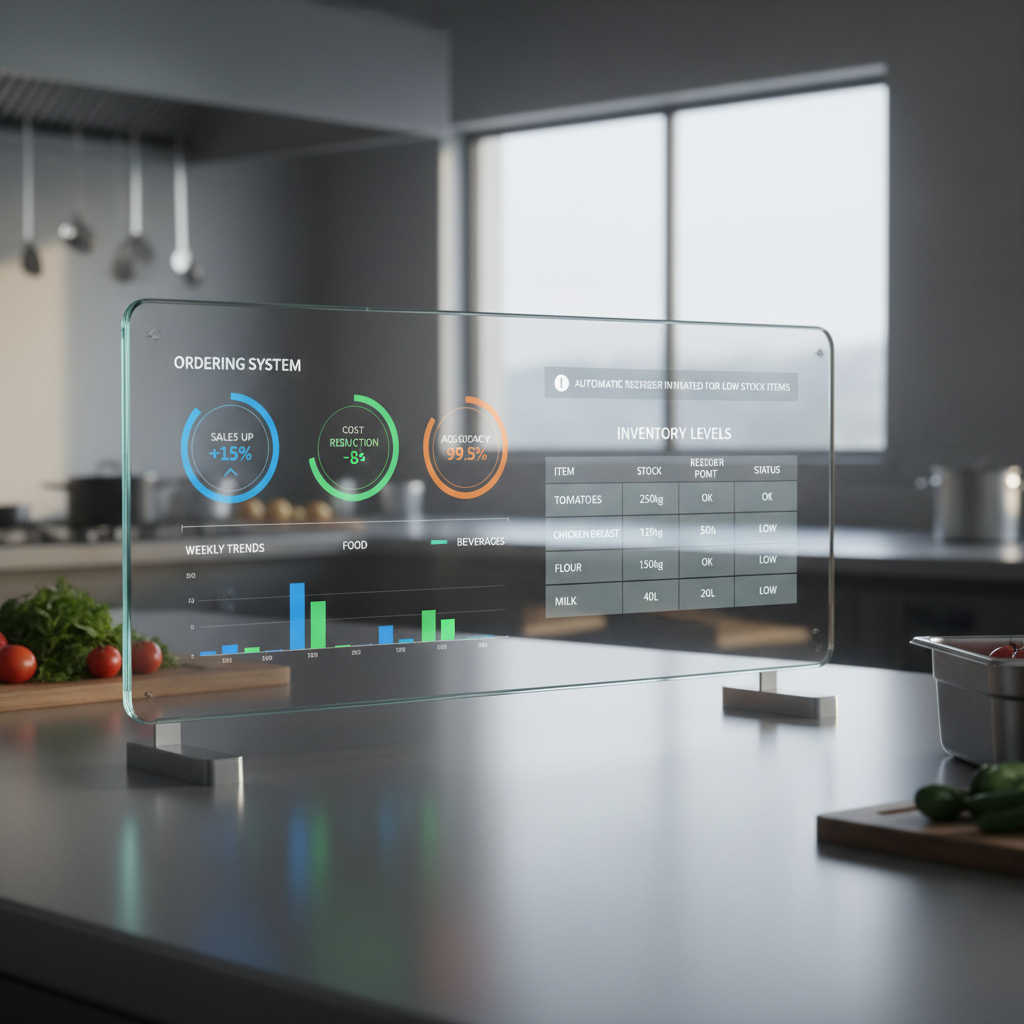
    Smart Ordering Systems vs. Manual: The Edge for Food Distributors

    Food distributors operate in a dynamic and often unpredictable landscape. They constantly manage vast inventories, orchestrate intricate logistics, and strive to satisfy diverse customer demands while minimizing waste and maximizing freshness.

    In such a high-stakes environment, the choice of ordering system can profoundly influence a business’s efficiency, profitability, and overall ability to thrive. Are you questioning whether your existing manual ordering processes are impeding your growth, or if a smart ordering system holds the key to unparalleled operational excellence?

    This comprehensive article delves into a detailed comparison, arming food distributors with the essential insights needed to make an informed strategic decision. We will thoroughly explore the definitive smart ordering systems benefits for food distributors, contrasting them sharply with the inherent realities and limitations of traditional, manual approaches.

    Discover which system aligns best with your operational scale, growth ambitions, and long-term business objectives.

    The Short Answer: Smart Ordering Systems vs. Manual At A Glance

    Choosing the right ordering system can be a pivotal decision for any food distribution business. Here is a quick overview of the core differences between smart and manual ordering systems, highlighting their primary characteristics and advantages. This snapshot will help you grasp the fundamental distinctions before we dive into the details.

    Smart Ordering Systems

    • Automation: Significantly reduces human intervention in routine tasks, leading to fewer errors and faster processing.
    • Data-Driven Decisions: Leverages historical data and real-time analytics to forecast demand, optimize inventory levels, and identify trends.
    • Efficiency: Streamlines the entire order-to-delivery process, improving speed and reducing operational costs.
    • Scalability: Easily adapts to increased order volumes and business growth without a proportional increase in manual effort.
    • Accuracy: Minimizes human error in order entry, inventory tracking, and invoice generation, enhancing overall data integrity.

    Manual Ordering Systems

    • Human Oversight: Relies entirely on human input and processing for every step, from order placement to fulfillment.
    • Flexibility (Limited Scale): Offers direct human control, which can be beneficial for very small-scale, highly customized orders or unique situations.
    • Simplicity (Initial Setup): Requires minimal initial technological investment, making it accessible for nascent businesses.
    • Direct Communication: Often involves direct phone calls or emails, fostering personal relationships with suppliers and customers.
    • Cost (Hidden): Appears low-cost initially due to lack of software investment, but incurs significant costs through labor, errors, and inefficiencies over time.

    What Is a Smart Ordering System And When Does It Shine?

    A smart ordering system, often powered by advanced software and artificial intelligence, automates and optimizes the procurement process for food distributors. It moves far beyond simple order entry, integrating with inventory management, sales data, and even market trends to make intelligent purchasing recommendations. These systems are designed to enhance efficiency, reduce waste, and improve overall supply chain responsiveness.

    Benefits of Smart Ordering Systems for Food Distributors

    The smart ordering systems benefits for food distributors are extensive and transformative, impacting nearly every facet of operations.

    • Optimized Inventory Management:
      • Reduces overstocking and costly spoilage by accurately predicting demand based on historical sales data, seasonality, and promotions.
      • Prevents stockouts by automatically reordering popular items when they reach pre-defined thresholds.
      • Improves cash flow by tying up less capital in excess inventory.
    • Enhanced Operational Efficiency:
      • Automates repetitive tasks like order generation, freeing up staff to focus on more strategic activities.
      • Speeds up the order cycle from placement to delivery, improving customer satisfaction.
      • Reduces administrative burden associated with manual data entry and reconciliation.
    • Cost Reduction:
      • Minimizes human errors that lead to incorrect orders, returns, or logistical nightmares.
      • Optimizes purchasing decisions, potentially unlocking better supplier pricing through bulk orders or strategic timing.
      • Lowers labor costs by automating tasks that previously required significant manual effort.
    • Improved Accuracy and Data Visibility:
      • Provides real-time visibility into inventory levels, order status, and supplier performance.
      • Generates precise reports and analytics, offering actionable insights for strategic planning.
      • Ensures data integrity across the entire supply chain, from warehouse to delivery.
    • Scalability and Growth:
      • Supports business expansion without the need for a proportional increase in staffing or manual overhead.
      • Integrates seamlessly with other business systems, such as accounting and CRM software, creating a unified ecosystem.
      • Facilitates entry into new markets by handling increased complexity and volume with ease.

    When to Choose a Smart Ordering System

    A smart ordering system becomes an indispensable asset when your food distribution business faces specific challenges or growth opportunities. Consider this option if:

    • Your inventory is complex and large, with many SKUs and varying shelf lives.
    • You experience frequent stockouts or excessive spoilage, leading to lost sales or waste.
    • Your operational costs are rising due to manual errors, inefficient processes, or high labor expenditures.
    • You aim for significant business growth and need a system that can scale without bottlenecking.
    • You lack clear data insights into your purchasing patterns, supplier performance, or customer demand.
    • You want to streamline your supply chain management and enhance overall responsiveness.

    Our suite of products, including smart ordering solutions, is specifically designed to address these very challenges for distributors.

    What Are Manual Ordering Systems And When Do They Win?

    Manual ordering systems encompass any method that relies heavily on human input and non-automated processes for managing orders. This can range from handwritten lists and spreadsheets to phone calls, emails, and fax machines. While seemingly outdated in many contexts, manual systems still hold a niche for certain types of operations.

    Characteristics and Limited Benefits of Manual Ordering Systems

    While the smart ordering systems benefits for food distributors are clear, manual methods do have their own specific, albeit limited, applications.

    • Direct Human Interaction: Can foster strong personal relationships with a small, consistent base of suppliers and customers through direct communication.
    • Low Initial Cost: Requires minimal upfront investment in software or hardware, making it accessible for start-up businesses with very tight budgets.
    • Immediate Flexibility (Small Scale): Allows for quick, on-the-spot adjustments to orders without navigating complex software, assuming the volume is extremely low.
    • Simplicity: For operations with a very limited number of SKUs and a predictable, small customer base, the process can appear straightforward initially.

    When to Choose a Manual Ordering System

    Manual ordering systems are generally suitable only for specific, often temporary, scenarios in food distribution. This approach might be acceptable if:

    • Your business is exceptionally small, perhaps a sole proprietorship, with a very limited number of products and customers.
    • Your order volume is extremely low and highly infrequent, making automation overkill.
    • You operate in a highly niche market where unique, custom orders are the norm, and personalized communication is paramount over efficiency.
    • You are a brand new startup with virtually no capital to invest in technology, and this is a short-term solution.
    • Your business model fundamentally prioritizes human touchpoints over efficiency and scale, though this is rare in distribution.

    However, even in these scenarios, the long-term costs of errors, time consumption, and lack of scalability quickly outweigh the initial simplicity.

    How Fit Changes The Decision

    The “best” ordering system isn’t universal; it’s entirely dependent on the specific needs, scale, and aspirations of your food distribution business. A system that perfectly suits a small, local artisan distributor might be a catastrophic bottleneck for a large regional player. Understanding your operational fit is crucial for making the right investment.

    Key Factors Influencing Your Choice

    • Business Size and Scale:
      • Small to Micro Distributors: With minimal inventory and a handful of clients, a manual system *might* suffice initially, though smart systems still offer long-term advantages.
      • Medium to Large Distributors: High volumes, diverse product lines, and numerous suppliers/customers make manual systems unsustainable and prone to failure. Smart systems are essential for managing complexity efficiently.
    • Inventory Complexity:
      • Simple Inventory: A few products with long shelf lives are easier to manage manually.
      • Complex Inventory: Fresh produce, dairy, frozen goods, and thousands of SKUs require sophisticated tracking, expiry date management, and demand forecasting that only smart systems can provide.
    • Growth Ambitions:
      • Stagnant or Niche: If your business intends to remain at its current small size without expansion, the urgency for automation is lower.
      • Growth-Oriented: Businesses planning to expand product lines, client base, or geographic reach *must* invest in smart systems for scalability.
    • Budget and Resources:
      • Limited Upfront Budget: Manual systems have low initial costs but higher operational costs over time.
      • Investment Capacity: Smart systems require an initial investment but deliver significant ROI through efficiency and reduced waste, embodying key smart ordering systems benefits for food distributors. Consider solutions like Prosessed which can offer scalable pricing.
    • Customer Expectations:
      • Modern B2B customers expect fast, accurate, and transparent order processing. Manual systems often fall short of these expectations, leading to dissatisfaction.

    Real Life Scenarios

    Let’s consider how different food distributors might approach the decision between smart and manual ordering systems. These scenarios highlight the practical implications of each choice.

    Scenario 1: The Rapidly Expanding Regional Distributor

    A regional food distributor has successfully grown its client base from 50 to 300 restaurants and grocery stores in just three years. Their product catalog now includes over 1,500 SKUs, including fresh produce, dry goods, and specialty items. They are still using a combination of spreadsheets, email, and phone calls for ordering.

    Decision: A smart ordering system is critical. The manual system is causing frequent errors, missed orders, stockouts of popular items, and significant staff burnout due to overwhelming data entry. Implementing a smart system will automate demand forecasting, optimize inventory turns for perishable goods, reduce order processing time, and provide real-time visibility across their expanding operations. This is where the core smart ordering systems benefits for food distributors truly shine.

    Scenario 2: The Niche Artisan Cheese Supplier

    A small, family-run business specializes in distributing high-end artisan cheeses to a select group of 20 gourmet restaurants and specialty shops. They have a very limited product range (around 30 unique cheeses) and highly personalized relationships with both their producers and customers. Orders are often small, bespoke, and involve direct communication about specific aging or availability.

    Decision: While a smart system could eventually be beneficial for detailed financial tracking, a manual system might still function adequately in this very specific, small-scale context for *order placement only*. However, even here, a simple digital system for inventory tracking and invoicing would be a significant upgrade, mitigating the risks of manual errors. For any growth, they would quickly need to transition.

    Scenario 3: High-Volume Frozen Goods Distributor

    A large distributor handles thousands of units of frozen goods daily for national supermarket chains. Their inventory management is extremely time-sensitive due to cold chain requirements, and errors can result in massive financial losses from spoilage. Their current system is a mix of outdated software and manual reconciliation.

    Decision: An immediate upgrade to a fully integrated smart ordering and inventory management system is imperative. The sheer volume and critical nature of their products demand automation, real-time tracking, precise forecasting, and seamless integration with logistics and cold chain monitoring. The smart ordering systems benefits for food distributors are most pronounced in such high-stakes environments, directly impacting compliance and preventing expensive waste. This company also benefits from robust inventory management capabilities.

    Common Myths About Ordering Systems

    Navigating the transition or decision between ordering systems often involves encountering various misconceptions. Let’s debunk some common myths.

    • Myth 1: “Smart systems are only for huge companies.”
      Reality: While enterprise solutions exist, many scalable smart ordering systems are now affordable and accessible for small to medium-sized food distributors, offering immediate ROI.
    • Myth 2: “Manual ordering is cheaper because there’s no software cost.”
      Reality: The true cost of manual ordering includes significant labor hours, high error rates, lost sales from stockouts, and waste from overstocking. These hidden costs often far exceed software subscription fees.
    • Myth 3: “Smart systems are too complicated to learn.”
      Reality: Modern smart ordering platforms prioritize user-friendliness with intuitive interfaces and comprehensive training resources. Many offer guided onboarding to ensure a smooth transition.
    • Myth 4: “My team prefers the old way.”
      Reality: While resistance to change is natural, once staff experience the benefits of reduced manual work, fewer errors, and improved efficiency, they typically embrace the new system. Automation frees them for more engaging tasks.
    • Myth 5: “I’ll lose personal touch with suppliers if I automate.”
      Reality: Smart systems automate routine order placement, allowing your team to focus on building stronger strategic relationships with suppliers, negotiating better terms, and resolving complex issues, rather than just data entry.
    • Myth 6: “My business is too unique for a smart system.”
      Reality: Many smart ordering solutions offer customization and flexibility to adapt to specific industry needs, including varying product attributes, delivery schedules, and customer requirements unique to food distribution.

    So… Smart Ordering System Or Manual?

    For the vast majority of food distributors today, the decision leans heavily towards implementing a smart ordering system. The undeniable smart ordering systems benefits for food distributors—including enhanced efficiency, significant cost savings, superior accuracy, and robust scalability—make them an indispensable tool in a competitive market. Manual systems, while seemingly simple upfront, ultimately hobble growth, drain resources through inefficiency, and leave businesses vulnerable to human error.

    Decision Guide

    To make your final decision, ask yourself these critical questions:

    1. What is your current order volume and inventory complexity? High volume, many SKUs, and perishable goods strongly dictate a smart system.
    2. What are your growth ambitions for the next 3-5 years? If you plan to expand, a smart system is non-negotiable for sustainable growth.
    3. How much are errors, waste, or stockouts currently costing you? Quantify these losses; they often justify the investment in a smart system.
    4. How much time does your team spend on manual ordering tasks? Reallocate that valuable time to strategic initiatives with automation.
    5. What level of data visibility and insight do you need? Smart systems provide the analytics required for proactive decision-making.

    If you find yourself nodding to the advantages of automation and data-driven decision-making, it’s time to explore the transformative power of smart ordering systems. Start your journey towards optimized operations by exploring solutions that empower your business to thrive. Visit our blog for more insights into distribution technology.

    Sources

    Frequently Asked Questions (FAQ)

    Q1: How quickly can a smart ordering system show ROI for a food distributor?

    A: The return on investment (ROI) for a smart ordering system can be surprisingly quick, often within months. This is due to immediate reductions in waste, errors, and labor costs, coupled with improved efficiency and customer satisfaction. Factors like your current level of inefficiency and the chosen system’s features will influence the exact timeline.

    Q2: Can a smart ordering system integrate with my existing accounting software?

    A: Most modern smart ordering systems are designed with integration capabilities. They can typically connect seamlessly with popular accounting software, CRM systems, and other operational tools, creating a unified data flow and eliminating duplicate data entry. Always check for specific integrations before committing to a system.

    Q3: What if my food distribution business has seasonal demand fluctuations?

    A: Smart ordering systems are particularly effective for businesses with seasonal demand. They utilize historical data, real-time sales trends, and even external factors to forecast demand more accurately, ensuring you are adequately stocked during peak seasons and avoid overstocking during off-peak periods, thereby maximizing smart ordering systems benefits for food distributors.

    Q4: Is it possible to implement a smart ordering system gradually?

    A: Yes, many providers offer modular solutions or phased implementation strategies. You might start with core ordering and inventory management features and then expand to more advanced functionalities like demand forecasting or supplier management as your team becomes comfortable and your needs evolve. This flexible approach allows for a smoother transition.