Tag: wholesale software

  • What is ERP? Definition, Meaning & Examples for Wholesale Businesses

    ERP or Enterprise Resource Planning is software that integrates a company’s key business processes into a single system. But for food wholesalers, traditional ERP is often too much – here’s what really works.
    Table of Contents

    ERP Meaning: What Does ERP Stand For?

    ERP means Enterprise Resource Planning. “ERP” is a suite of integrated software that assists businesses in managing and automating their core operations from one platform.

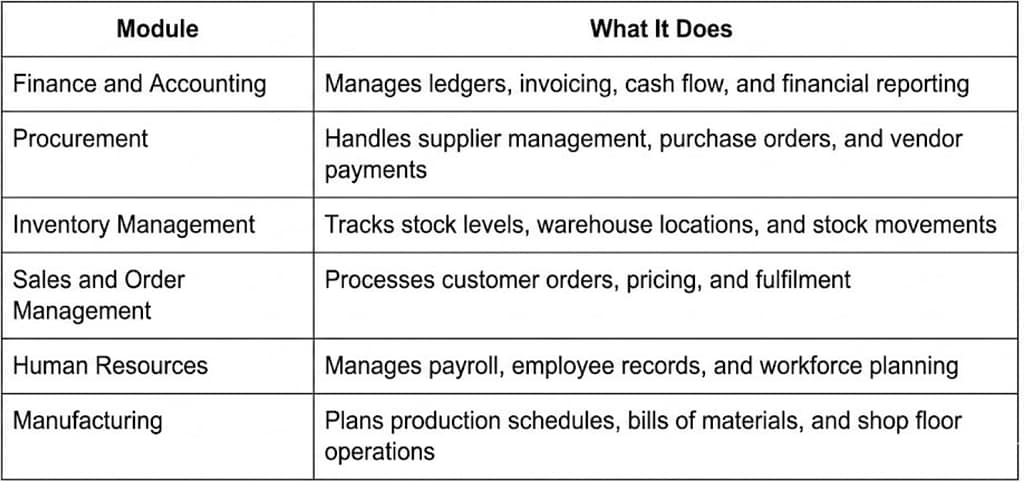
    ERP (Enterprise Resource Planning) is an integrated software application that combines the critical business functions of finance, human resources, procurement, inventory and sales into one unified system. This integration gives organisations a single view of their operations in real time.

    It was introduced in the 1990s, as a development of earlier manufacturing planning tools. Today ERP systems are used in a wide range of industries like retail, healthcare, logistics, and food distribution. The underlying promise is simple: Rather than having disparate tools for accounting, inventory, and purchasing, an ERP connects them so that data can flow freely between departments.

    How Does an ERP System Work?

    An ERP system works by gathering data from all over a business into one database. For instance, when a sales order is made, the system automatically updates inventory levels, triggers procurement if stock is low, and feeds the transaction into the finance module. And because they all run off the same data set, there’s no lag or errors that come from manual handoffs between disconnected tools.

    Core ERP Modules Explained
    How ERP Connects Business Departments

    The core idea of ERP is the “single source of truth.” There are no different spreadsheets or different software for each department, everything is in one system. If a stock count is adjusted in the warehouse, the finance team immediately sees the effect. Procurement issues Purchase order Inventory gets updated No phone call. The shared data layer reduces errors and speeds up decisions, providing leadership with a real-time, accurate view of the business.

    Types of ERP Systems

    On-Premise ERP

    On-premise ERP is installed and hosted on a company’s own servers and infrastructure. The software is licenced to the company and the company is responsible for the hardware maintenance, updates and security. This model gives the most control and customisation, but requires a high upfront investment in hardwarex and IT staff. Most prevalent in large enterprises with dedicated technology teams .

    Cloud ERP

    Cloud ERP ( aka SaaS) is hosted by the vendor on their servers and accessed through the Internet, usually for a monthly or annual fee. Providers handle the infrastructure and upgrades, reducing upfront costs and letting companies deploy faster. For small and mid-sized businesses, the best model for availability and scalability is Cloud ERP systems. Most of the modern ERP vendors (NetSuite, Microsoft Dynamics 365) are cloud first these days.

    Industry-specific ERP

    Industry-specific ERP systems are designed to follow the workflows of a given industry, whether that’s food and beverage, construction, or healthcare. These systems come pre-configured with the relevant compliance requirements, reporting structures and operational logic for that industry, rather than having to heavily customise a generic platform. This is could include things like batch tracking and expiry date management for food businesses, out of the box.

    Hybrid ERP

    Hybrid ERP combines on-premise and cloud deployments. For instance, a company could deploy its core financial modules on local servers for data security, but use cloud applications to access other functions like sales or human resources. This is often the case for companies that are transitioning from legacy on-premise systems to cloud infrastructure, or for companies that operate in regions with different data residency regulations.

    SAP

    SAP is the largest ERP vendor in the world, with its flagship product SAP S/4HANA serving large enterprises across manufacturing, retail, and logistics. SAP is known for its depth and customizability, but implementations are lengthy and expensive, often requiring specialist consultants and multi-year rollout timelines. It is most suited to large organizations with complex, global operations.

    Oracle NetSuite

    Oracle NetSuite is a cloud-based ERP solution that many growing mid-market companies rely on. It’s an all-in-one that handles financials, inventory, order management and CRM. Plus, it’s popular with e-commerce and wholesale businesses. NetSuite is more accessible than SAP, but it still carries steep licencing and implementation costs that can run into six figures.

    Dynamics 365 (Microsoft)

    Microsoft Dynamics 365 is a modular ERP and CRM platform that integrates with the wider Microsoft ecosystem, including Excel, Teams and Power BI. It gives companies more flexibility to buy individual modules rather than the whole suite. Good for mid-to-large businesses already in the Microsoft environment that want tight integration across productivity tools.

    Odoo is

    Odoo is an open source ERP platform that offers a large number of modules including accounting, inventory, purchasing and e-commerce. It’s less expensive than SAP or NetSuite, thanks to its modular pricing structure and open-source foundation. It has a strong community of developers. Odoo is popular with small and medium businesses that need flexibility but still have technical resources for customisation.

    If you are comparing specialized distribution tools against broader ERP platforms, see our detailed breakdown on the Cin7 alternative for food wholesale page.

    ERP vs Specialised Distribution Software: What Food Wholesalers Should Know

    Why Traditional ERP Falls Short for Food Trade

    Traditional ERP systems were designed for the needs of large manufacturing or retail enterprises. For food wholesalers, this mismatch creates real operational problems.

    First, implementation timelines are a serious obstacle. A typical SAP or NetSuite deployment for a mid-sized business takes six to twelve months before it is fully operational. During that window, a food distribution business is managing live orders, perishable stock, and supplier relationships without the system it is paying for.

    Second, the cost is prohibitive for most SMBs. Between licensing, implementation consultants, customization, and training, a full ERP rollout can run into hundreds of thousands of dollars before the first invoice is processed.

    Third, and most critically, generic ERP modules were not built with food trade in mind. Features like First Expiry First Out (FEFO) inventory rotation, perishable batch tracking, and cross-border food compliance are typically not native to standard ERP systems. They need either expensive third party add-ons or custom development, neither of which is fast or easy.

    What food wholesalers actually need

    What food wholesalers really need is a purpose-built distribution platform that fits their specific workflow without the burden of a full ERP implementation.

    That means native batch tracking and expiry management, so FEFO rotation is done automatically, not by spreadsheet. That means AI-based demand forecasting that considers seasonality and supplier lead times for particular food categories. That is mobile-first order management that works the way a food sales rep actually works – taking orders on the go and sending invoices through WhatsApp.

    This is exactly the workflow for which OrderIT, Prosessed AI’s order management product, is built. It starts with the way food wholesale orders really flow, from the sales call to the delivery confirmation, rather than bolting on food-specific features to a generic ERP.

    The essential difference: traditional ERP demands that food companies modify their business processes to adapt to the software. Business adapts to a dedicated distribution platform.

    Benefits of ERP Systems (and Their Limitations)

    ERP Benefits

    Data by department. The single database model breaks down data silos and guarantees that everyone on the team is using the same data. This limits errors that arise from finance, warehouse and sales teams holding their own separate records.

    Improved reporting and visibility. Because all transactions go through a single system, leadership benefits from real-time reporting across the whole business without the need to manually pull data from multiple sources.

    Process automaton ERP systems can automate routine tasks like purchase order creation, invoice matching and triggers for stock replenishment, thereby reducing manual workload and human error.

    Scalability. A good ERP can grow with the business adding new product lines, warehouses and order volume without replacing the system.

    Typical problems and disadvantages of ERP

    Expensive to implement. Beyond the licence fees, there are costs for consultants, custom development, data migration and staff training for ERP projects. Smaller companies often find that they are paying more than they expected.

    Long deployments. Most traditional ERP implementations take six to 12 months. That lag has a direct impact on the operations of a fast-moving food distribution company.

    overengineering Complexity . Most ERP systems have capabilities that small businesses would never use. Managing and paying for that complexity adds overhead but no value.

    Overhead on change mgmt. People need to change the way they work for ERP implementations. Not always a little. Poor adoption is one of the top-cited reasons why ERP projects fail to deliver the expected return on investment.

    ERP for Small and Medium Food Businesses: Is It Worth It?

    For most small and medium food wholesalers, a full ERP system is the wrong tool for the job. The implementation timelines, costs, and complexity that come with platforms like SAP or NetSuite were designed for large enterprises with dedicated IT departments and multi-year technology budgets.

    An SMB food wholesaler does not need an HR module or a manufacturing planning engine. It needs accurate inventory, reliable order processing, supplier procurement, and demand forecasting that works for perishable goods. Implementing a full ERP to get those capabilities is like hiring an entire accounts department when what you needed was one good bookkeeper.

    What the category of food wholesale SMBs actually needs is a lean, purpose-built distribution platform that deploys in weeks, costs a fraction of enterprise ERP, and is already configured for the compliance and operational requirements of food trade. ProcurePro by Prosessed AI is built on exactly this principle, giving food wholesalers native procurement capabilities without the ERP overhead.

    ERP Frequently Asked Questions

    What is ERP?

    ERP means Enterprise Resource Planning. It is a nod to integrated business management software that links core business functions like finance, inventory, procurement, HR and sales onto a single platform.

    What’s the Difference Between ERP and CRM?

    ERP and CRM have different main purposes, but there is some overlap. ERP manages internal business processes like finance, inventory, supply chain, and production. CRM, or Customer Relationship Management software, is all about managing external relationships with customers, including sales pipelines, contact history and marketing activity. Many ERP platforms today have a CRM module, and some vendors offer both as part of an integrated suite.

    Is QuickBooks an ERP software?

    QuickBooks is NOT an Enterprise Resource Planning (ERP) system. This is accounting software that does bookkeeping, invoicing and basic financial reporting. It connects with some inventory and payroll tools, but doesn’t have the cross functional integration of a real ERP. Businesses that are outgrowing QuickBooks tend to look at cloud ERP platforms or industry-specific distribution software.

    What ERP is best for food distribution?

    Traditional ERP systems like SAP or NetSuite are more of a best fit as compared to most food distribution businesses. They are expensive, slow to deploy and lack native food-specific features. Specialised distribution platforms for food wholesalers, like Prosessed AI, provide the same basic features that any distribution platform would have – inventory management, procurement, and order processing – but also come with features that are unique to food, like FEFO batch tracking and AI demand forecasting, and at a fraction of the cost and implementation time.

    How much does an ERP system cost?

    ERP costs vary widely by platform and business size. SAP implementations for mid-sized businesses range from $150,000 to $1 million+ with consulting and customisation included. Oracle NetSuite pricing begins at roughly $30,000 per year for smaller companies but quickly scales depending on the number of users and modules. Odoo is cheaper but customisation still requires development investment. Prosessed AI is built for a specific purpose and is priced at a fraction of those costs. See Prosessed AI pricing for a direct comparison.

    Why Food Wholesalers Choose Prosessed AI Over Traditional ERP

    Food wholesalers evaluating ERP consistently run into the same wall: the platforms built for large enterprise manufacturing are not built for the pace, perishability, and compliance requirements of food distribution.

    Prosessed AI was built from the ground up for this gap. It deploys in weeks, not months, so businesses are not running a live operation on spreadsheets while waiting for an ERP to go live. Its features are food-native by design, covering FEFO inventory rotation, perishable batch tracking, WhatsApp invoicing for field sales teams, and AI-powered demand forecasting calibrated for seasonal and perishable product categories.

    Where SAP or NetSuite implementations routinely run into six figures and require specialist consultants, Prosessed AI is a lean platform priced for the real cost structure of food wholesale SMBs. There are no generic modules to configure around and no functionality you will never use. Every feature maps to a real workflow in a food distribution business.

    If you are evaluating ERP options for your food wholesale operation, the most important question is not which ERP to choose. It is whether ERP is the right category of tool at all.
    See How It Works at Prosessed AI

  • Best Software for Food Wholesalers and Distributors

    Running a food wholesale business means dealing with chaos every single day. Juggling items that spoil quickly sits alongside wild price swings from suppliers. Orders come in different currencies, while customers send messages through WhatsApp without warning. Sales teams stick to old spreadsheet habits instead of modern tools. Mistakes creep in easily when systems barely hold together. Wasted time turns into lost money quicker than expected.

    Midnight rolls around faster when you are stuck typing instead of clicking. Firms tracking orders by hand face paperwork loads forty to fifty percent heavier compared to teams running on tailored tools. Gains pile up elsewhere – think client growth, sharper pricing talks, or simply shutting down work earlier. What eats hours one day adds up to lost chances over weeks.

    Here’s the catch: plenty of programs labeled for wholesale trade actually ignore food needs. Instead of handling spoilage right, standard stock apps fall short. Even strong ERPs demand endless setup time along with sky-high fees. Most setups also expect buyers to order online – forgetting how many still send voice messages via chat.

    This guide walks through seven top tools built for food wholesalers in 2026 – spelling out which teams benefit most, yet where each one falls short. While some fit big distributors well, others suit small operations better; not every platform delivers equally across the board. Each option shows strengths, though specific needs shape whether it clicks or misses entirely.

    Table of Contents:

    1. What to Look For in Food Wholesale Software
    2. The 7 Best Software for Food Wholesalers (2026)
    3. Head-to-Head Comparison Table
    4. How to Choose the Right Software for Your Business Size
    5. FAQs
    6. The Bottom Line

    What to Look For in Food Wholesale Software

    Most wholesale systems aren’t made for how food moves out the door. When trucks are loading at 6 AM, small flaws in the software start screaming for attention. Knowing which features matter most makes it easier to tell them apart before things get hectic.

    AI-powered order management is no longer a premium feature.Top systems in 2026 create bills automatically, recommend how much to restock, catch odd prices, while also pulling orders straight from WhatsApp chats. Without built-in smart features, you’ll end up patching gaps with extra steps.

    Food-specific workflows matter more than you might expect. Food importers need tools that handle batch details, track expiration dates, manage variable weights on invoices, while also monitoring stock inside containers. Standard inventory systems usually lack such features right away.

    WhatsApp and chat-based ordering is how most people buying food in growing markets prefer to place orders. Logging into a system just does not catch on when it skips their usual way of chatting. Starting elsewhere rarely sticks if it ignores daily habits.

    Multi-currency and global trade support is essential when dealing with international suppliers or cross-border sales. Working out total delivered costs becomes easier when duties are tracked automatically. Dealing with vendors using foreign money works better without extra accounting steps getting in the way. Keeping everything together saves time and reduces errors along the way.

    Mobile-first design matters for your field sales team and for warehouse staff who are not sitting at a desk. If the mobile experience is clunky, your team won’t use it.

    Realistic pricing and implementation time are worth evaluating honestly. Take a system running fifty grand with half a year just to launch – that kind of weight slows down most food distribution businesses. What hits fast makes a difference.

    Now, here are the seven tools worth evaluating.

    The 7 Best Software for Food Wholesalers (2026)

    1. Prosessed (OrderIT) – Best for Food Wholesalers and Importers

    What sets Prosessed apart? It’s made just for people moving food across borders – importers, exporters, shippers. The main tool, called OrderIT, runs the entire ordering process start to finish. Intelligence drives it, woven into every step along the way.

    Here’s what sets Prosessed apart – built on real wholesale needs, not guesses from someone behind a screen. When orders arrive through WhatsApp? OrderIT pulls them straight in. Need invoices made automatically right after an order hits? It handles that without delay. Pricing shifts depending on volume, buyer level, or money type? Already part of the system. Wondering if you’ll get stuck with stock nobody wants? Forecast tools help avoid exactly that.

    Machine learning powers what some might call an AI layer – no empty branding here. Instead of guessing when supplies run low, past sales help shape smart restocking alerts. Unusual price tags or odd order sizes get noticed early. Mistakes that could drain budgets often start small, but spotting them does not have to be slow.

    Most platforms struggle when currencies shift, yet this one adjusts without extra steps. Tracking single containers matters more than people admit – it sees what others overlook. Anyone dealing with overseas food shipments knows timing gets messy, especially nights and weekends. Orders pop up whenever buyers decide, no schedule required. Juggling many products feels smoother here than almost anywhere else. When your job means handling hundreds of items across far-flung partners, simplicity becomes critical. It fits those moments when chaos seems normal.

    Best for: Food wholesalers, importers, exporters, and distributors of all sizes
    Standout features: AI order entry via WhatsApp, dynamic pricing, demand forecasting, multi-currency support
    Limitation: Focused on food and FMCG, not a fit for non-food wholesale

    Start a free trial with Prosessed or book a 20-minute demo to see OrderIT in action.

    2. Cin7 – Best for Multichannel Wholesale

    Cin7 handles stock and orders reliably, especially if you sell through more than one place – like stores, online, or bulk buyers. Because it connects easily with many other tools, managing what’s in stock becomes smoother over time. Purchase requests get organized without much fuss. Reports come together clearly, shaped by real usage rather than guesswork. Features have had room to grow, so they fit how actual teams work.

    Food distributors might find Cin7 lacking when it comes to smart tools built for their needs. Instead of artificial intelligence features, users get basic operations without much guidance. Messaging through WhatsApp isn’t supported right out of the box. Predicting what stock will sell? That function doesn’t exist here either. Workers in storage areas often struggle at first because the layout feels confusing. When dealing with items that expire quickly and inventory that moves fast, missing automated support slows everything down.

    Still, when your wholesale operation spans multiple channels – especially beyond just food – a system like Cin7 might fit well, especially with its links to online stores and bookkeeping apps. Curious how it holds up next to software made only for food businesses? Check the Cin7 Alternative guide for a closer look.

    Best for: Multichannel wholesalers with mixed product categories
    Standout features: Strong integrations, inventory management, multichannel support
    Limitation: Steep learning curve, no AI features, not built for food-specific workflows

    3.QuickBooks Commerce – Best for SMBs with QuickBooks

    QuickBooks Commerce fits small wholesale shops already using QuickBooks every day. Because the link to accounting works without hiccups, shifting data feels smooth. Teams lacking tech experts won’t struggle either, since the layout stays clear and straightforward. What stands out is how little setup it demands just to get going.

    Once things get complicated, gaps start showing up. Workflows built just for food? Missing entirely. Catch-weight billing isn’t there, nor does it track when batches expire, plus messaging orders via WhatsApp won’t work here. International trade tools feel like an afterthought – barely enough for basic needs. The system feels shaped by local small-scale selling, not the messy reality of moving goods across borders, which most importers deal with every day.

    Starting with spreadsheets? Then moving into QuickBooks might make sense for a small local distributor. Yet when goods come from abroad – or drivers hit the road selling full time – this setup won’t stretch far.

     Best for: Small domestic wholesalers already using QuickBooks
    Standout features: QuickBooks integration, clean interface, affordable pricing
    Limitation: Limited food-specific features, poor global trade support, no AI capabilities

    4. NetSuite ERP – Best for Large Enterprises

    One big reason NetSuite stands out? It handles money tracking, stock levels, deliveries, customer records – all inside one system. When you run a major food delivery operation and have tech staff ready, plus years to set things up, this kind of setup makes sense. What holds it together isn’t magic – it’s how everything links without extra tools.

    Heavy demands trail close behind its capabilities. Most companies spend half a year or longer getting NetSuite up and running, often paying big money long before subscriptions start adding up. Screens feel packed. Tweaking anything usually means calling in coders. Justifying the full expense proves tough when you’re a medium-sized food distributor.

    Most companies making under roughly fifty million dollars each year find NetSuite too much. Sure, it brings room to adapt how things run. Yet that comes with added layers that slow decisions down.

     Best for: Large enterprise food distributors with dedicated IT resources
    Standout features: Full ERP coverage, finance, inventory, supply chain, CRM
    Limitation: Very expensive, long implementation time, excessive complexity for most food wholesalers

    5. Pepperi – Best for FMCG Field Sales Teams

    Out there among tools for sales teams, Pepperi fits right into the daily grind of people who sell face to face. Instead of juggling paper or spreadsheets, reps get a clean way to show products, take orders on tablets, while managers track where each person goes. Picture someone walking into a convenience store, pulling up pricing and stock levels in seconds – that part works smoothly. If your business sends lots of sellers to small stores every day, this handles what they actually do on the ground. Not flashy, just gets the routine tasks done without breaking down.

    Out there among food importers and distributors, weak spots show up most in moving goods and running daily ops. While Pepperi focuses on sales tools, it skips handling shipping containers, following incoming freight, or streamlining office tasks behind the scenes. When your operation runs on tight logistics and demands that orders talk directly to warehouse activity, relying on Pepperi means patching things together after the fact.

    For a comparison of Pepperi against platforms with broader operations coverage, visit our Pepperi Alternative page.

    Best for: FMCG companies with large field sales teams
    Standout features: Mobile catalog, route management, B2B ordering
    Limitation: Weak logistics and operations features, not suited for importers managing containers

    6. Fishbowl Inventory – Best for Warehouse-Heavy Operations

    Inside your warehouse, Fishbowl keeps tabs on what goes where. Tied directly into QuickBooks, numbers flow without double entry. Moving goods? It logs every shift across shelves and zones. Purchase jobs get lined up neatly, never lost in spreadsheets. Companies making or shipping lots of physical things lean on it when space gets busy. Complexity doesn’t scare it – clutter meets order.

    Fishbowl falls short when it comes to handling sales tasks with smart tech. Instead of automated ordering, you get nothing driven by artificial intelligence. Messaging through WhatsApp? Missing entirely. Predicting what stock sells when? Not built in. The system focuses on storage, not full-cycle delivery workflows. Suppose tracking inventory is your priority and sales systems are already running elsewhere. Then Fishbowl might slot right into place. But if everything must connect seamlessly, prepare to link disjointed software pieces.

    Best for: Warehouse-heavy operations with existing sales tools
    Standout features: Inventory tracking, bin management, QuickBooks integration
    Limitation: No AI capabilities, no sales automation, not suited as a standalone distribution platform

    7. Unleashed – Best for Food Manufacturers

    What stands out about Unleashed is how it supports food makers juggling recipes, batches, and stock levels. Instead of just counting items, it follows ingredients from delivery through to final product. Because its flow matches real kitchen rhythms, many find it smoother than standard systems. While others struggle with complex ingredient chains, this one keeps pace without extra steps. Finished goods get logged just as carefully as what goes into making them. Through each stage, the updates happen quietly, without delays or manual checks piling up. Even when output shifts week to week, the record keeping holds steady. Since every batch ties back to source materials, tracing stays simple. Rather than forcing processes into rigid boxes, it bends slightly to fit actual work patterns. Most tools lag behind production speed – this doesn’t.

    Most food distributors won’t find Unleashed quite right. Built for making things, not moving them, it leans heavily on production workflows instead of supply chain moves. Forecasting needs outside tools since there’s no built-in intelligence. Runs well if you make products and also sell them. But when your work is bringing in goods or shipping out bulk orders – no factory involved – something else here fits tighter.

    Best for: Food manufacturers who distribute their own products
    Standout features: Bill of materials, batch production tracking, inventory management
    Limitation: No native AI, demand forecasting requires add-ons, limited distribution-specific features

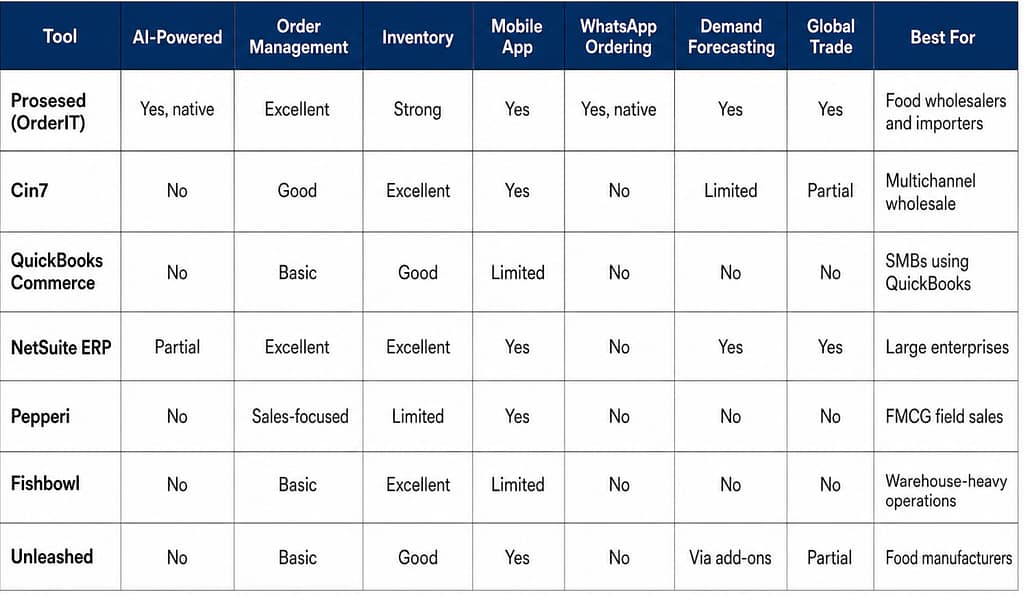
    Head-to-Head Comparison Table

    The pattern here is consistent. Prosessed is the only platform that checks the boxes food wholesalers actually need: AI-powered automation, WhatsApp ordering, demand forecasting, and global trade support, all in a single tool built for the food sector.

    If you’re ready to see how it works in practice, start a free trial at Prosessed with no card required.

    How to Choose the Right Software for Your Business Size

    Not every food wholesaler has the same needs. Here is a practical framework for narrowing down your options based on where your business is today.

    If you’re a small distributor or just getting off spreadsheets: Pick whatever fixes your worst headache first. Most tiny food shops struggle with tracking orders and sending bills. Try Prosessed’s free run – it uses smart software to handle orders, no months of setup needed. If you already use QuickBooks for money stuff, their Commerce tool works fine too.

    If you’re a mid-sized importer or distributor with a field sales team: One spot where sales teams, operations, and buyers link up matters now. Messaging through WhatsApp for orders shows up as key – so does phone-friendly layout along with predicting what sells. Built right into its bones, Prosessed fits this shape well. When stock needs stretch past meals and go channel-crazy, give Cin7 a look.

    If you’re a large enterprise with dedicated IT resources: When it comes to managing large-scale operations, NetSuite keeps up – though expect a heavy lift during rollout. If big-company features matter but cost doesn’t have to, consider Prosessed: smart systems ready fast, built like premium tools minus the long wait.

    If your main business is food manufacturing: What sets Unleashed apart is how it manages production tasks – few others match its flow. When stock control is the main hurdle, Fishbowl steps into the picture.

    Not sure which plan fits your operation? Prosessed’s team can walk you through your options.

    For more detailed guidance on selecting the right platform for your distribution setup, read our guide on how to choose the right wholesale distribution software and our roundup of the top AI ordering systems for modern food wholesalers.

    FAQs

    What is the best software for food wholesalers?

    When it comes to food wholesalers in 2026, Prosessed (OrderIT) stands out simply because it started life made just for them. Built from the ground up for food distributors, its core knows what matters. Instead of forcing round pegs into square holes, it flows naturally with how these companies actually work. While systems such as Cin7 or NetSuite can technically keep up, they weren’t shaped by daily delivery runs or perishable inventory rhythms. 

    What is food distribution software and what does it do?

    Start here if you move goods from vendor to buyer. One system handles ordering steps plus keeps count of what sits on shelves. Information travels straight from sales folks into storage areas, then lands neatly in billing sections. No retyping needed when updates happen somewhere else. Teams swap messages about stock levels using shared records instead of old spreadsheets. Predictions for future needs come from patterns already stored inside the tool. People who send supplies get tracked just like those receiving them. Smooth links between each part cut down delays that slow everything else. What gets sold shows up instantly where it matters most.

    Is there software built specifically for food importers and exporters?

    True. Among systems made for those moving food across borders, none shows intent more plainly than Prosessed. Built-in abilities – such as monitoring stock by container, setting prices in various currencies, letting buyers send orders through WhatsApp, handling variable weights during invoicing – set it apart from standard distribution software. Typical inventory or enterprise platforms lump groceries in with everyday goods, ignoring critical needs tied to spoilage risks and complex overseas logistics.

    How is AI used in wholesale distribution software?

    Orders arriving by WhatsApp or email get processed without human hands. Instead of people checking each one, software reads them and acts. Invoices appear automatically once details are confirmed. Odd requests – like strange prices or big volumes – trigger alerts. Past buying trends help guess when stock will run low. Pricing shifts depending on who the buyer is or what the market does. At the center of tools such as Prosessed, intelligence isn’t tacked on – it runs everything from within.

    What’s the difference between an ERP and a wholesale management platform?

    One system, such as NetSuite or SAP, handles everything from money matters to people tasks, shipping stuff around, making goods – pretty much all big parts of running a company. These systems pack serious power yet often come with high prices and tricky setup processes. Instead of going broad, some tools go deep – for example, Prosessed focuses only on what distributors need: moving orders smoothly, tracking stock levels, setting correct prices, keeping buyers informed. Most food-focused wholesale businesses find better results quicker using specialized software like that, spending less cash overall – even when linking up with current bookkeeping programs already in place.

    The Bottom Line

    One step ahead in 2026 stands a platform shaped by how food moves through supply chains. At the top, only a few bulky ERP systems remain – costly, hard to manage. Meanwhile, scattered across smaller operations are basic tracking apps, never made with perishable goods in mind. What sets apart the real solution is its design rooted directly in daily distribution reality.

    Starting out as a food wholesaler, importer, or distributor? Prosessed fits just there. No credit card needed for the free trial – setup wraps up in days, sometimes even less.

    If your business demands tight multichannel control, Cin7 might catch your eye. When big companies can handle the cost and tech setup, NetSuite still sets the bar. Everyone else finds themselves stuck – generic tools just don’t cut it next to software made for food distribution.

    Start your free Prosessed trial today and see the difference a food-first platform makes.

  • How to Choose the Right Wholesale Distribution Software (And Why Most Businesses Get It Wrong)

    Most wholesalers pick the wrong software. Not because the software is bad. But because they chose it the wrong way.

    This guide cuts through the noise. No generic lists. No vendor hype. Just the real criteria, the real costs, and a clear framework to get it right.


    The Painful Truth About Software Selection

    Picking software is like buying shoes. It’s not about the fanciest pair. It’s about finding the one that actually fits you.

    Most businesses skip that part. Then they wonder why everything hurts.


    1. The 7 Mistakes That Sink Software Projects

    These aren’t rare. They happen to smart teams constantly.

    Mistake 1: Chasing the Famous Brand Big-name software wins on marketing, not on fit. The most popular system in the market might be completely wrong for your business.

    Mistake 2: Obsessing Over the Cheapest Price Cheap upfront often means expensive later. Hidden costs ,customization, training, workarounds ,add up fast and quietly.

    Mistake 3: Not Knowing What You Actually Need Most teams think they know their requirements. They don’t. Generic checklists miss the real problems hiding in daily workflows.

    Mistake 4: Planning Implementation After Signing You don’t start planning after you sign the contract. You start before. Teams that skip this step hit nasty surprises post-launch.

    Mistake 5: Stakeholder Chaos When finance, operations, and IT all want different things, nothing moves. You need everyone aligned before you pick anything.

    Mistake 6: Moving Messy Data Into a New System Years of bad spreadsheet data don’t get better in a new system. They get worse. Clean the data first, migrate second.

    Mistake 7: Skipping Change Management Even perfect software fails if your team doesn’t use it. Training and buy-in aren’t optional ,they’re the whole game.

    The real reason ERP projects fail is almost never a bad product. It’s bad planning ,vague goals, skipped integrations, and training that comes too late.


    2. How to Actually Evaluate Software

    The right software depends on where your business is right now. Not where you want to be in five years.

    Small businesses need cost and simplicity. Systems like Odoo or Business Central cover the basics. The main risk? You’ll outgrow them faster than you think.

    Mid-market companies need scalability and integration. NetSuite and Acumatica handle that well. The risk here is managing too many systems talking to each other.

    Enterprise distributors need control and deep customization. SAP and Oracle serve this tier. The risk is over-engineering processes that don’t need it.

    Cloud vs. On-Premises ,the honest trade-off:

    Cloud software sets up fast, scales easily, and the vendor handles maintenance. But your data lives on their servers and customization is limited.

    On-premises software gives you full control and deep customization. But it costs more upfront and needs your own IT team to manage it.

    Neither is better. One is better for you. Know the difference before you decide.

    Don’t just look at the license fee. Build a 5-year cost model ,including training, integrations, upgrades, and downtime. That’s the real number.


    3. The Systems That Keep Your Warehouse Running

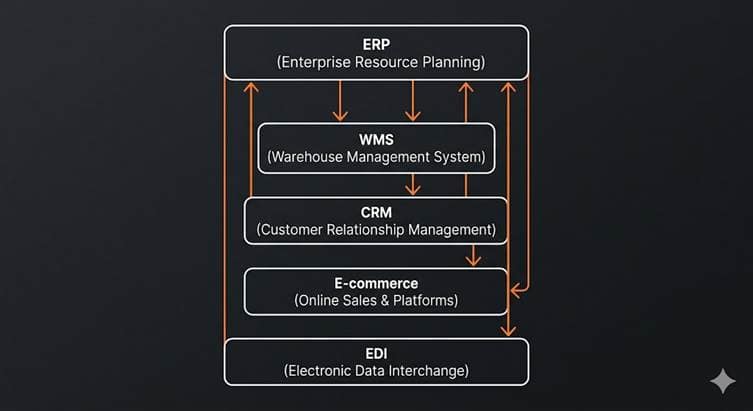
    Modern wholesale distribution isn’t one system. It’s a team of systems that must talk to each other ,perfectly.

    ERP is your backbone. It handles finance, inventory, pricing, and procurement. Every other system should feed data back into it.

    WMS (Warehouse Management System) runs your daily warehouse ,picking, packing, shipping. It must stay in sync with your ERP in real time. If it doesn’t, your stock data lies to you.

    CRM holds your customer and sales data. Without a live connection to your ERP, your sales team is quoting stock that doesn’t exist.

    E-commerce platforms capture online orders. Without integration, someone has to enter those orders manually. That’s a disaster waiting to happen.

    EDI and APIs are how your systems actually talk to each other. These connections are fragile. A small update in one system can silently break your entire order flow.

    The number one failure point in distribution IT is integration. When your WMS and ERP don’t share live data, stockouts and overselling follow.


    4. The Real Cost of Getting It Wrong

    This isn’t just embarrassing. It’s financially devastating.

    Recovering from a failed ERP implementation typically costs 150–200% of the original project budget. If your project was $500K, recovery can easily hit $750K to $1M ,or more.

    Waste Management sued SAP for $100M over a botched ERP rollout. MillerCoors sued HCL for $100M when a new system failed entirely.

    Beyond the lawsuits, there’s something harder to measure: time. Every month spent untangling a bad system is a month your competitors are moving forward. Your digital roadmap freezes. New initiatives stall. Customers notice.

    The smallest distributor might survive a wrong choice invisibly. For larger companies, an ERP failure can wreck balance sheets ,and careers.


    5. Which Software Is Right for You?

    There’s no universally best system. There’s only the best system for your situation.

    NetSuite is built for fast-growing mid-market distributors. It handles high order volumes, multiple warehouses, and consolidated financials across subsidiaries. It’s powerful but complex ,not a fit for early-stage teams.

    SAP Business One suits smaller distributors who need solid supply chain basics ,lot tracking, batch management, and standard warehouse automation. It’s reliable and proven, though its cloud evolution has been slower than pure-cloud competitors.

    Odoo is open-source and modular. Start with only what you need and expand over time. It’s extremely affordable and highly customizable. The trade-off: advanced features often require developers to configure.

    Cin7 is not a full ERP ,it’s an inventory and order management platform. It shines for businesses adding sales channels or warehouse locations. It connects inventory, 3PL, e-commerce, and POS in one place. It deploys in weeks, not months.

    Fishbowl sits on top of QuickBooks and adds real warehouse management ,barcoding, kitting, multi-warehouse tracking. It’s the right call when you’re on QuickBooks, need more warehouse depth, and don’t want a six-figure ERP bill. It will be outgrown by fast-scaling businesses.

    The question isn’t “which is best?” The question is: which one fits where my business is today ,and won’t become a bottleneck tomorrow?

    Not sure which one fits your business? That’s exactly what Prosessed is built for. Prosessed uses AI to analyse your operations, your stage, and your goals ,then tells you which system actually makes sense for you. No sales pitch. No guesswork. Just a clear answer backed by data.

    The question isn’t “which is best?” The question is: which one fits where my business is today ,and won’t become a bottleneck tomorrow? Prosessed helps you answer that.

    OrderIt App by Prosessed AI

    The OrderIt app by Prosessed AI is a smart order management solution designed to simplify and streamline the entire sales and distribution process. It empowers wholesalers, distributors, and manufacturers with real-time visibility, efficient order tracking, and seamless inventory integration. With an intuitive interface and automation-driven workflows, OrderIt helps businesses reduce manual effort, improve accuracy, and boost overall productivity, making it easier to scale operations and deliver better customer experiences.


    6. How AI Is Changing the Way Distributors Decide

    The future of software selection isn’t a one-time choice. It’s a continuous, data-driven process. AI is at the center of it.

    Smart companies are now modeling decisions before committing. Instead of guessing which system is right, they simulate the outcome first.

    The next generation of ERP isn’t just recording transactions. It’s recommending actions ,telling you to move stock between warehouses before a shortfall hits, or flagging that your order volume has doubled and your current system is showing strain.

    This isn’t science fiction. It’s already starting. Wholesalers who adopt decision intelligence early will make faster, better calls than competitors still relying on gut feel and static reports.

    AI doesn’t replace human judgment in software selection. It makes that judgment sharper ,with simulated ROI, risk models, and continuous feedback instead of a one-time gut call.


    7. A Simple 8-Step Framework to Get It Right

    Stop guessing. Use this every time.

    Step 1 ,Define what success actually looks like. Set measurable goals before you look at a single demo. “20% faster fulfillment” beats “better software” as a target every time.

    Step 2 ,Map your real workflow. Walk through your quote-to-cash and purchase-to-pay processes step by step. Find where the actual bottlenecks and errors live.

    Step 3 ,Separate must-haves from nice-to-haves. Involve warehouse leads, finance, and IT. Ask vendors to demonstrate your exact scenarios ,not their best-case demos.

    Step 4 ,Score vendors on a weighted scorecard. Pick 3–5 vendors max. Score on fit, integration ease, total cost, and vendor stability. Keep the list short to avoid decision fatigue.

    Step 5 ,Run a pilot on your key processes. Test a real scenario in a sandbox before going live. It’s far cheaper to find problems here than after full rollout.

    Step 6 ,Lock down integration plans before you sign. Confirm who owns each connection ,ERP to WMS, ERP to CRM. Negotiate implementation support in the contract, not as an afterthought.

    Step 7 ,Build a 5-year cost model. Include license fees, hosting, consulting, training, upgrades, and a 20–30% buffer for overruns. Compare to expected savings and revenue growth.

    Step 8 ,Decide, launch, and keep measuring. Make a clear decision with leadership sign-off. Measure early results against your goals. Adjust as you learn.


    The Bottom Line

    The best software for your business is the one that fits where you are today ,and grows with you without becoming a problem tomorrow.

    It’s not the most famous brand. It’s not the cheapest option. And it’s definitely not whatever your competitor is using.

    Choose strategy, not just software. Plan implementation before you sign. Keep every decision tied to a real business outcome.

    That’s how the best distributors make this call. And with AI-powered decision intelligence, that process is getting sharper, faster, and more reliable every year.